Naming Kafka objects (III) – Kafka Connectors

We discussed naming conventions for Kafka topics and Kafka Producers/Consumers in the previous two posts. This time, we are focusing on Kafka Connect and the connectors running on it.

We will not discuss naming conventions related to Kafka Connect clusters (e.g., config/storage/offset topic names, group.id, etc.) They are normally managed by SysAdmin/DevOps teams and these posts are zooming in developer-related naming conventions.

Kafka Connect in a few words

What is Kafka Connect?

Kafka Connect is a tool for streaming data between Apache Kafka and external systems, such as databases, cloud services, or file systems. It simplifies data integration by providing a scalable and fault-tolerant framework for connecting Kafka with other data sources and sinks, without the need to write custom code.

In other words, Kafka doesn’t exist in a vacuum; there are different “non-Kafka” systems that it needs to interact with, i.e., consume from and produce to. Kafka Connect simplifies this task massively by offering “connector plugins” that will translate between:

  • Protocols: SFTP->Kafka, Kafka->SFTP, Kafka->HTTP, Salesforce API->Kafka, etc.
  • Formats: CSV->Avro, Avro->JSON, Avro->Parquet, etc.

Theoretically, Kafka Connect can also translate between schemas (i.e., data mapping) via Single Message Transformations. However, I advise against using them except for the most trivial transformations.

Kafka Connect defines two types of connectors:

  • Source connectors consume data from non-Kafka systems (e.g., databases via CDC, file systems, other message brokers) and produce it for Kafka topics. These connectors are “Kafka producers” with a client connection to the source data system.
  • Sink connectors consume data from Kafka topics and produce it to non-Kafka systems (e.g., databases, file systems, APIs). Internally, they work as “Kafka Consumers” with a client connection to the destination system.

Naming Conventions

Now that we have a basic understanding of Kafka Connect let’s examine the most relevant settings that require precise, meaningful naming conventions.

connector.name

This is obviously the “number one” setting to define. A few things to consider:

  • It has to be globally unique within the Connect cluster. In other words, no connector in the cluster can share the same name.
  • It is part of the path to access information about the connector config and/or status via the Connect REST API (unless you use the expand option and get them all at once).
  • For Sink connectors, it serves as the default underlying consumer group (plus a connect- prefix). In other words, if your connector is called my-connector, the underlying consumer group will be called connect-my-connector by default.

With that in mind, the proposed naming convention is as follows:

[environment].[domain].[subdomain(s)].[connector name]-[connector version]

ComponentDescription
environment(Logical) environment that the connector is part of.

For more details, see https://javierholguera.com/2024/08/20/naming-kafka-objects-i-topics/#environment
domain.subdomain(s)Leveraging DDD to organise your system “logically” based on business/domain components.

Break down into a domain and subdomains as explained in https://javierholguera.com/2024/08/20/naming-kafka-objects-i-topics/#domain-subdomain-s
connector-nameA descriptive name for what the connector is meant to do.
connector-versionAs the connector evolves, we might need to run side-by-side versions of it or reset the connector completely giving it a new version. Format: vXY (e.g., ‘v01’, ‘v14’).

This field is not mandatory; you can skip it if this is the first deployment.

Do we really need [environment]?

This is a legit question. We said that the connector name must be (globally) unique in a given Kafka Connect cluster where it is deployed. A Kafka Connect cluster can only be deployed against a single Kafka cluster. Therefore, it can only sit in a single (physical) environment. If that is the case, isn’t the “environment” implicit?

Not necessarily:

  1. Your Kafka cluster might be serving multiple logical environments (DEV1, DEV2, etc.). As a result, a single Kafka Connect cluster might be sitting across multiple logical environments even if it belongs to a single physical environment. In this deployment topology, you might have the same connector in multiple logical environments, which would require the [environment] component to disambiguate and guarantee uniqueness.
  2. Alternatively, you might deploy multiple Kafka Connect clusters serving single logical environments against a single (physical) Kafka cluster. You might be tempted to think in this scenario [environment] is not needed since the connector name will be unique within its cluster. However, “behind the scenes”, sink connectors create a Kafka Consumer whose name matches the connector name (plus a connect- prefix). Therefore, if multiple Connect clusters with the same connector name create the same Kafka Consumer consumer group, all sort of “issues” will arise (in practice, they end up either forming a big consumer group targeting the topics across all logical environments in that physical Kafka cluster).

In summary, if you don’t use any concept of “logical environment(s)” and can guarantee that a given connector will be globally unique in the Kafka cluster, you don’t need the [environment] component.

consumer.override.group.id

Starting with 2.3.0, client configuration overrides can be configured individually per connector by using the prefixes producer.override. and consumer.override. for Kafka sources or Kafka sinks respectively. These overrides are included with the rest of the connector’s configuration properties.

Generally, I don’t recommend playing with consumer.override.group.id. Instead, it is better to give an appropriate name to your connector (via connector.name), as per the previous section.

However, there might be scenarios where you can’t or don’t want to change your connector.name yet you still need to alter your default sink connector’s consumer group. Some examples:

  • You have already deployed your connectors without [environment] in your connector.name (or other components) and now you want to retrofit them into your consumer group.
  • You have strict consumer group or connector.name naming conventions that aren’t compatible with each other.
  • You want to “rewind” your consumer group but, for whatever reason, don’t want to change the connector.name.

In terms of a naming convention, I would recommend the simplest option possible:

[environment or any-other-component].[connector.name]

In other words, I believe your consumer group name should track as closely as possible your connector.name to avoid misunderstandings.

consumer/producer.override.client.id

client.id was discussed in a previous post about Producer’s client.id and Consumer’s client.id.

As discussed in that post, it is responsible for a few things:

  • Shows up in logs to make it easier to correlate them with specific producer/consumer instances in an application with many of them (like a Kafka Streams app or a Kafka Connect cluster).
  • It shows up in the namespace/path for JMX metrics coming from producers and consumers.

With that in mind, knowing that we already have a pretty solid, meaningful and (globally) unique connector.name convention, this is how we can name our producer/consumer client.id values.

Connector TypeProperty OverrideValue
Source connectorproducer.override.client.id{connector.name}-producer
Sink connectorconsumer.override.client.id{connector.name}-consumer

Conclusion

We have discussed most relevant properties that require naming conventions in Kafka Connect connectors. As usual, we aim to have semantically meaningful values that we can use to “reconcile” what’s running in our systems and what every team (and developer) owns and maintains.

By now, we can see emerging a consistent naming approach rooted around environments, DDD naming conventions and some level of versioning (when required).

Naming Kafka objects (II) – Producers and Consumers

In a previous post in this “naming” series, we discussed how to name Kafka topics. The intention was to name them semantically meaningfully while avoiding collisions and ambiguity. The focus was on the “nature” of the topics’ data.

This post will discuss the two main “clients” connected to those topics: producers who write data into them and consumers who read data from them. The focus will move away from the “data” towards the applications involved in the data flow.

  1. Producers first
    1. client.id
      1. Organising your JMX metrics
      2. Naming convention
        1. Why do we need an entity/event name?
        2. Don’t we need a ‘version’ part?
    2. transactional.id
  2. Consumers second
    1. group.id
      1. Why do we need an entity/event name?
      2. Why versioning the group.id value?
      3. If I’m versioning my application, should I use it for the ‘version’ value?
    2. group.instance.id
    3. client.id
  3. Conclusions

Producers first

Nothing can be consumed if produced first; therefore, let’s start with producers.

They do a very “simple” job:

  1. Pull metadata from the cluster to understand which brokers take the “leader” role for which topics/partitions.
  2. Serialise the data into byte arrays.
  3. Send the data to the appropriate broker.

In reality, it is much more complicated than this, but this is a good enough abstraction. Out of the dozens of configuration settings producers support, only two settings accept a “naming convention”.

client.id

The Kafka documentation defines client.id as follows:

An id string to pass to the server when making requests. The purpose of this is to be able to track the source of requests beyond just ip/port by allowing a logical application name to be included in server-side request logging.

We want a naming convention that makes mapping Producer applications to domains and teams easy. Furthermore, these names should be descriptive enough to understand what the Producer application aims to achieve.

Organising your JMX metrics

There is also an extra role that client.id plays that people tend to forget: it namespaces observability metrics. For example, producers emit metrics under the following JMX MBean namespaces:

  • kafka.producer:type=producer-metrics,client-id={clientId}
  • kafka.producer:type=producer-node-metrics,client-id={clientId},node-id=([0-9]+)
  • kafka.producer:type=producer-topic-metrics,client-id={clientId},topic={topic}

Notice how all of them use clientId as part of the namespace name. Therefore, if we don’t assign meaningful values to client.id, we won’t be able to distinguish the appropriate metrics when multiple producers consolidate their metrics into a single metrics system (like Prometheus), especially if they come from the same application (i.e., 1 application using N producers).

client.id also regularly features in other observability components like logs.

Naming convention

The proposed convention looks like this:

[environment]-com.[your-company].[domain].[subdomain(s)].[app name].[entity/event name]

ComponentDescription
[environment](Logical) environment that the producer is part of.

For more details, see https://javierholguera.com/2024/08/20/naming-kafka-objects-i-topics/#environment
com.[your-company]Follows a “Java-like” namespacing approach to avoid collisions with other components emitting metrics to the centralised metric database
[domain].[subdomain(s)]Leveraging DDD to organise your system “logically” based on business/domain components. Break down into a domain and subdomains as explained in https://javierholguera.com/2024/08/20/naming-kafka-objects-i-topics/#domain-subdomain-s
[app-name]The app name should be specific enough to make it easy to find the codebase involved and the team that owns it.
[entity/event-name]Describes what information the producer is sending. It doesn’t need to include the full topic name since the context is already clear (e.g., payment, transaction, account).

This field is not mandatory.

Why do we need an entity/event name?

When your application has multiple producers, client.id needs to be unique for each one. Therefore, the ‘entity/event’ in the last section of the client.id name disambiguates them. You don’t need to define an entity/event name if you only use one producer for the application.

Don’t we need a ‘version’ part?

Other naming conventions define a ‘version’ as part of their respective names. This is only necessary when the client is related to state; for example, Consumers and Streams apps must store committed offsets.

Producers, on the other hand, are completely stateless. Adding a ‘version’ part would only make sense if we keep multiple Producer application versions running side-by-side. Even then, one would argue that versioning the application itself would be a better strategy than versioning the Producer client.id

transactional.id

The Kafka documentation defines transactional.id as follows:

The TransactionalId to use for transactional delivery. This enables reliability semantics which span multiple producer sessions since it allows the client to guarantee that transactions using the same TransactionalId have been completed prior to starting any new transactions. If no TransactionalId is provided, then the producer is limited to idempotent delivery. If a TransactionalId is configured, enable.idempotence is implied

There are a few “small” differences between client.id and transactional.id:

  1. client.id doesn’t need to be unique (but I strongly recommend it). transactional.id MUST be unique.
  2. client.id is more “visible” towards developers (through O11Y). transactional.id is mostly opaque, operating behind the scenes in the transaction management subsystem.
  3. client.id can change, although it would make your O11Y information very confusing. transactional.id MUST be stable between restarts.

Other than that, there is nothing special about transactional.id so I recommend using the same naming convention that I have proposed for client.id in the section above.

Consumers second

We have sorted consumers and they are happily producing data. It’s time to look at the other side: consumers.

They too do a very “simple” job:

  1. Get a bunch of topic/partitions assigned as part of the consumer group partition assignment process.
  2. Connect to the brokers acting as leaders for those topic/partitions.
  3. Regularly (attempt) to pull new data from the assigned topic/partitions.
  4. When there is something available, read it (as byte arrays) through the connection.
  5. When it arrives to the application space, deserialise the data into actual objects.

A few configuration settings play a roll in this process.

group.id

The Kafka documentation defines group.id as follows:

A unique string that identifies the consumer group this consumer belongs to. This property is required if the consumer uses either the group management functionality by using subscribe(topic) or the Kafka-based offset management strategy.

We want a naming convention that makes mapping Consumers applications to domains and teams easy. Furthermore, these names should be descriptive enough to understand what the Consumer application aims to achieve.

The proposed naming convention is as follows:

[environment]-com.[company-name].[domain].[subdomain(s)].[app name].[entity/event-name]-[version]

ComponentDescription
[environment](Logical) environment that the consumer is part of.

For more details, see https://javierholguera.com/2024/08/20/naming-kafka-objects-i-topics/#environment
com.[your-company]Follows a “Java-like” namespacing approach to avoid collisions with other components emitting metrics to the centralised metric database
[domain].[subdomain(s)]Leveraging DDD to organise your system “logically” based on business/domain components. Break down into a domain and subdomains as explained in https://javierholguera.com/2024/08/20/naming-kafka-objects-i-topics/#domain-subdomain-s
[app-name]The app name should be specific enough to make it easy to find the codebase involved and the team that owns it.
[entity/event-name]Describes what information the producer is sending. It doesn’t need to include the full topic name since the context is already clear (e.g., payment, transaction, account).

This field is not mandatory.
[version]Only introduce or change this value if you need to run side-by-side versions of the app or simply start from scratch. Format: vXY (e.g., ‘v01’, ‘v14’).

This field is not mandatory.

Why do we need an entity/event name?

When your application has multiple consumers, it needs a unique group.id for every one of them. Therefore, the ‘entity/event’ in the last section of the group.id name should disambiguate between them, and it becomes mandatory.

You don’t need to define an entity/event name if you only use one consumer for the application.

Why versioning the group.id value?

The Kafka Consumer uses group.id to define a consumer group for multiple instances of the same application. Those instances collaborate within the group, sharing partitions, picking up partitions from failed instances and committing offsets so other instances don’t process records that another instance has processed already.

Offsets are committed under the group.id name. Therefore, it is critical to use the same group.id value across application deployments to guarantee that it continues to consume from where it left it.

However, there are times when we might want to change the group.id and effectively reset the consumer. The easiest way to do that is to change the group.id. In this case, we can use ‘version’ to have a new consumer group that ignores where the previous deployment instances got up to and falls back to auto.offset.reset to decide where to start consuming.

If I’m versioning my application, should I use it for the ‘version’ value?

Short answer: NO

Longer answer: you probably are (loosely) semantic versioning your application; every merged PR will represent a new version. You don’t want to change your group.id every time your application version changes. The ‘version’ mentioned in the group.id is very specific to the consumer group and how it manages offsets. Don’t mix the two together.

group.instance.id

The Kafka documentation defines group.instance.id as follows:

A unique identifier of the consumer instance provided by the end user. Only non-empty strings are permitted. If set, the consumer is treated as a static member, which means that only one instance with this ID is allowed in the consumer group at any time. This can be used in combination with a larger session timeout to avoid group rebalances caused by transient unavailability (e.g. process restarts). If not set, the consumer will join the group as a dynamic member, which is the traditional behavior.

In other words, while group.id identifies 1 or more instances that belong to a consumer group, group.instance.id identifies unique instances.

The main purpose of group.instance.id is to enable static membership to the consumer group. This helps reducing group rebalancings when instances are not available briefly. The assumption is it is better to delay whatever partitions are consumed by the temporarily missing instance than rebalance the complete group, affecting all other instances.

I recommend using the same group.id naming convention PLUS something that identifies the instance uniquely and is stable between restarts.

client.id

client.id serves the exact same purpose in consumers and producers. Therefore, I will refer you to the previous section for producer’s client.id for a naming convention proposal. See https://javierholguera.com/2024/09/12/naming-kafka-objects-i-producers-and-consumers/#client-id

Conclusions

Naming is difficult and requires care. However, investing in good naming conventions reduces accidental complexity, helps with debugging and diagnosing your system, and supports development through its end-to-end lifecycle.

In this post, I proposed multiple naming conventions that aim to be semantically meaningful, allow you to organize your system into sensible components, and support your system’s incremental evolution.

Naming Kafka objects (I) – Topics

There are only two hard things in Computer Science: cache invalidation and naming things.

Phil Karlton

I started working with Apache Kafka in 2015 when I joined Funding Circle. We were early adopters of the technology (and the architectural approach that comes with it) and had the pleasure (not really) to work with pre-1.0 versions. Since then, I have worked with Kafka in every single company I have been part of.

Fast-forward almost 10 years, and I think I have accrued enough experience to take the risk of proposing solutions to one of the hardest problems in software engineering: naming things.

In this first post, I propose a naming convention for the most important object in a Kafka system: Kafka topics. In subsequent posts, I’ll cover other objects like consumer groups, Stream topologies, and Kafka Connect connectors.

  1. DDD all things
  2. Topic naming convention
    1. [environment]
    2. [visibility]
    3. [topic-type]
    4. [domain].[subdomain(s)]
    5. [record-name]
    6. [key-name]
    7. [topic-version]
  3. Conclusions

DDD all things

I asked ChatGTP for a brief definition of what DDD is (emphasis mine):

Domain-Driven Design (DDD) is a software development approach that focuses on modeling software based on the real-world domain it represents, emphasizing collaboration between technical experts and domain experts to create a shared understanding and ensure that the software reflects the core business logic and needs.

In other words, when applying DDD, you have to adopt the vocabulary of the business and structure your system based on how the company structures (and collaborates) itself. This is very aligned with a sociotechnical approach to software architecture.

I like leveraging DDD to structure systems and communicate intent. Naming things is the cornerstone for both. Names (and namespaces) organise concepts (i.e., structure) while revealing what they are “about” (i.e., intent).

Topic naming convention

Kafka topics contain the information stored and streamed in Apache Kafka. In that sense, they are not too different from other data containers like database tables, messaging queues, S3 buckets, files, etc.

With that in mind, there are three factors to take into account:

  • A topic is named after the content (not after any given consumer or producer). If you think about it, you would never name a database table based on what reads/writes from it. Neither you should do with Kafka topics.
  • The topic names must explicitly convey the topic content (i.e., what data is stored in there). One of Kafka’s selling points is the ability for producers and consumers to exchange information without coupling; topic names that clearly define data content underpin this exchange.
  • Your naming convention must avoid naming collisions. It should support the ability to choose the right name for a topic without worrying that this name might be a token.

With that in mind, the following convention ticks all those requirements:


[environment].[visibility].[topic type].[domain].[subdomain(s)].[record name]-by-[key name]-[topic version]

Let’s break down each component.

[environment]

Mandatory: yes

The environment describes the “logical” environment that a topic belongs to.

Take into account Kafka clusters can be expensive, whether self-hosted (e.g., K8S via Strimzi Operator) or via SaaS (e.g., AWS MSK, Confluent Cloud). If you have a low-volume environment like most pre-production environments, it makes economic sense to “reuse” the same physical cluster for multiple logical environments (e.g., DEV, QA, Sandbox, UAT, Pre-PROD), particularly in an environment where cost savings are king (see https://javierholguera.com/2024/07/02/software-engineering-trends-that-are-reverting-i/).

It also supports ephemeral environments if you achieve the necessary CI/CD maturity.

[visibility]

Mandatory: yes

David Parnas enunciated the principle of “information hiding” in 1972. It’s 2024, and we still haven’t found a better way to reduce coupling and complexity than “hiding what you don’t need to see”; in other words, encapsulation and abstraction are still king to reduce cognitive overload and improve maintainability. This is true for data as well, not just code/behaviour.

With that in mind, it makes sense to categorise topics depending on “who should have access to this data”. Kafka doesn’t have any such taxonomy built-in; instead, you can “play” with roles and ACLs to limit/grant access. However, that is more of an InfoSec approach than naturally categorising topics (and data) based on their nature. One can argue that if topics are properly categorised in terms of visibility, we are one step away from automating ACL access that enforces such visibility at the producer/consumer level.

Another strong reason to categorise visibility is incompatible changes (backward and/or forward). When we know they apply to a topic with limited visibility, we can more easily manage the blast radius of such changes.

I propose the following visibility options.

ValueDescription
ExternalFor topics used to exchange data with systems outside yours (e.g., third parties, SaaS, customers) if they support a Kafka-based interface.

These topics require strong backward and forward compatibility (unless otherwise negotiated with the other parties).
SharedTopics that are visible to all other components of the system between system areas (similar to internal REST APIs).

These topics require strong backward and forward compatibility
InternalTopics that should only be accessed within the same DDD domain or bounced context.

Ideally, that would be a limited number of well-known applications that can be maintained and deployed together.
PrivateTopics that are owned by a single application. They are similar to a private database/table that supports the functioning of a single microservice.

Compatibility is decided on a per-application basis by the team maintaining it.

[topic-type]

Mandatory: yes

Not all messages are born equal. Clemens Vasters has a good introduction to different types of messages in his “Events, Data points and messages” talk from 2017. While Kafka is not the best option for some of these types of messages, we all end up “abusing” it to an extent, if anything, because having multiple messaging technologies in your stack might be worse than stretching one of them beyond its optimal use case.

With that in mind, and without going to the level of granularity that Clemens proposes, below covers the “most common” types. Choosing the right type helps convey a lot of meaning about the nature of the data that is stored in the topic.

Message Typetopic-type valueDescription
CommandscommandA command conveys the intention to change the state of the system (e.g., “ConfirmPayment”).
EventseventAn event captures something that has happened and is being broadcasted for other systems to consider (e.g., “Payment Confirmed”).
EntitiesentityAn entity groups fields that represent a single, consistent unit of information.

When you design event-first architectures, events are modelled first (to support business processes), and entities “emerge” from them to group information, generally around DDD boundaries (for example, “Payment”, “Customer”, “Account).
Change Data CapturecdcCDC topics define a stream of changes happening to the state of a given entity, commonly represented as a database table. In other words, they are a stream of CRUD changes to a table.

Capturing the before/after of the affected entity simplifies downstream consumers.
NotificationsnotificationUnlike a normal event, they don’t contain all the information that was captured as part of the event happening. Instead, they contain a link back to a place where the information was captured.

They are useful when the payload would be “too big” to embed in the event, so instead, the consumer has the option to “trace back” to independent storage like S3 for full details.

[domain].[subdomain(s)]

Mandatory: yes

This part leverages DDD (or any other approach that you choose to organise your system) to guarantee there aren’t any naming collisions.

It is also quite powerful as a first layer to navigate the hundreds (or thousands) of topics in your system. If you combine visibility AND domain/subdomains(s), you can quickly identify the appropriate stream containing the information that your consumer requires.

For example, if your consumer needs to react to a payment being confirmed, the following topic would be quite easy to find.

prod.shared.event.payments.reconciliation.payment-confirmed-by-payment-id

You can search by the environment, visibility, and domain/subdomain and list a few dozen topics at most that will be part of the “reconciliation” domain before finding the right one.

[record-name]

Mandatory: yes

A descriptive name for the data stored in the topic is similar to naming database tables.

The record name “grammar” will be influenced by the topic type.

Topic typeRecord nameExample
CommandsPresent Tense + NounSendEmail, ApproveOrder
EventsNoun + Past TensePaymentReceived, AccountClosed
EntitiesNounOrder, Account, Payment, Customer
Change Data CaptureTable Name
NotificationsNoun + Past TenseLike ‘events’

[key-name]

Mandatory: yes

The name of the field that serves as the key for the record. It is VERY important to clearly identify what field in the message payload is used as the key to partition records in the topic.

Remember that in Kafka, strict ordering is only guaranteed within the partition (and not guaranteed across partitions in a given topic). Therefore, whatever key is used to partition will be the ordering criteria.

For example, if we have an “entities” topic partitioned by the entity’s natural key, we know all changes to that entity will be strictly ordered. If, for any reason, we chose a different key, the same changes to that entity might be “consumed” in a different order than they happened across different partitions within the topic.

[topic-version]

Mandatory: no

The final field is only here because incompatible changes DO happen despite our best intentions to avoid them.

When we face such change, we normally need to follow a process like this:

  1. Create a second version of the topic topic (i.e., -v2).
  2. Start a migrating topology that upcasts messages from -v1 to -v2 continuously.
  3. Point all our consumers to the new -v2 topic.
  4. Once the consumers are up-to-date, migrate all our producers to the -v2 topic.
  5. Remove -v1 topic.

Since this situation shouldn’t happen for most of your topics, this name component is optional (until you need it).

Conclusions

It is not a simple naming convention, and although it is unlikely, you must be careful not to overrun the topic name length limit (255 characters).

However, if you follow it thoroughly, you will find that what would be otherwise a mess of topics where it is impossible to find the right information becomes a structured, well-organised, self-serving data platform.

Kafka Connect – Offset commit errors (II)

In the last post, we examined the problem in detail, established a hypothesis about the issue, and validated it with multiple metrics that pointed in the expected direction.

However, I intentionally left out any suggestion for a solution, although the investigation would have given us some hints on what we can do. In this post, we look at possible solutions and the pros/cons of each one.

Controlling the flow at Debezium

As discussed in the previous post, Debezium has a number of configuration settings that influence how the Connector pre-fetches MySQL data changes and convert them into SourceRecord objects and how they are delivered to Kafka Connect when it calls poll on the connector:

SettingDefaultDescription
max.queue.size8192Max number of pre-fetched records, awaiting to be polled by Connect
max.batch.size2048Max number of records delivered in every call to poll

On the pro side, it is easy to imagine that if we restricted these two values, it would be possible to reduce the amount of data that flows from Debezium to Connect. However, on the cons side, it would be tough to configure them in a way that produces a deterministic reduction of the number of outstanding messages.

Bear in mind that, as we saw in the last post, Connect constantly calls poll, even before the previous batch of records has been acknowledged. Therefore, I expect that if we were to reduce max.batch.size to 1024, the only result we would obtain is more calls to poll from Connect while still filling the outstanding messages queue.

Think about the flow:

  1. poll returns 1024 records.
  2. Connect puts these records in the outstanding message queue.
  3. Connect sends these records with the KafkaProducer.
  4. KafkaProducer puts those records in its internal queue immediately.
  5. Connect finishes the loop and starts a new one, calling poll again.

Therefore, returning fewer records in each poll call would only slow down temporarily the queue getting filled up.

That said, if we were to also reduce max.queue.size to 1024, it would force Debezium to cross the network for every call to poll. Debezium would have to reach out to MySQL to read more records to satisfy every poll; that would definitively have an impact. However, with the default Kafka Producer settings, it is most likely that one fetch from MySQL would provide many more records than they fit in a single produce request, keeping the Kafka producing phase as the overall bottleneck end to end.

In any case, we do not want to solve the offset commit errors problem by reducing the overall system performance. That would just open the door for other issues.

Limiting the outstanding message queue

Since the root of the problem is how many records are accumulated in the outstanding message queue, one might think that limiting this queue should be the primary solution to the problem. Unfortunately, there is no setting to limit the size of this queue, and the implementation used (IdentityHashMap) is not bound either.

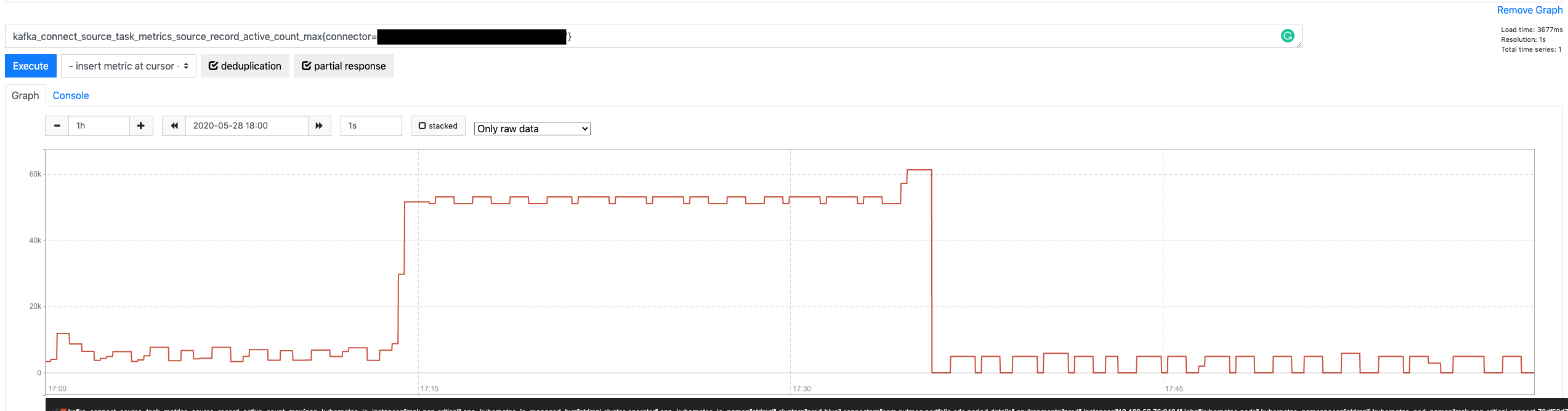
However, if we look at the graph for the source-record-active-count-max metric again, we might notice that the number of active records eventually hit the ceiling and didn’t keep growing.

Source Record Active Count Max

Doesn’t that mean that it is effectively bound? Yes, but not 🙂

It is bound in the sense that there is something that prevents it from growing ad infinitum, but that is more of a happy coincidence that a proper mechanism. What is happening is this:

  1. Records returned by poll are put on the outstanding message queue.
  2. Those same records are passed, one by one, to KafkaProducer‘s send method.
  3. The send method places them in its internal queue and returns immediately.
  4. If the KafkaProducer queue is already filled up, send doesn’t return; instead, t blocks until there is space in the queue.

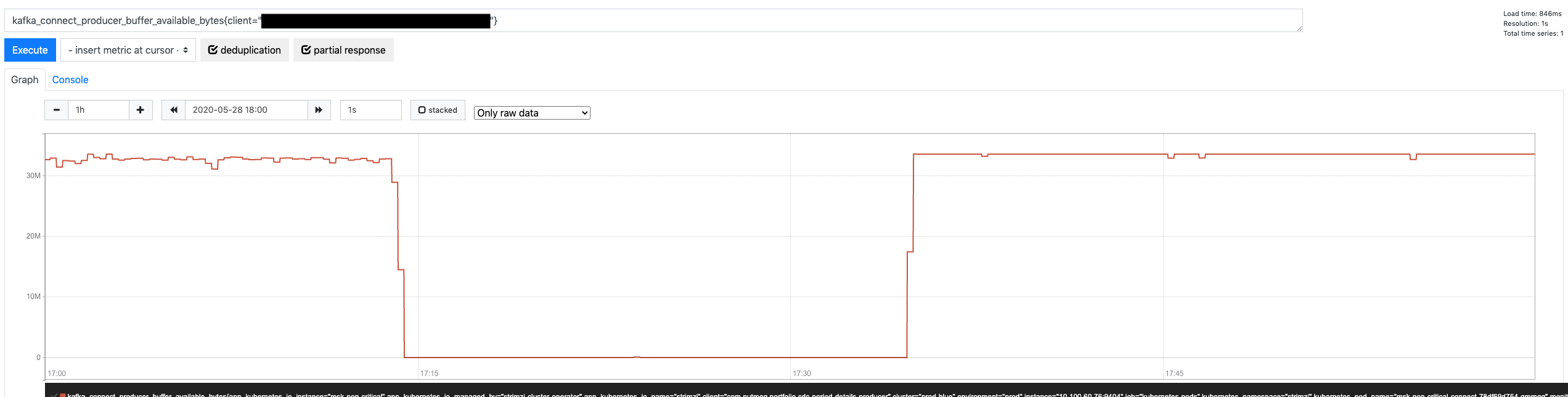
That is precisely why the outstanding queue doesn’t grow any further. It is not because it is implicitly limited; it is because the SourceWorkerTask blocks calling send once the KafkaProducer queue is filled up. When that happens, it can’t call poll anymore, and it does not add more records into the outstanding queue.

Another metric can confirm this assumption: KafkaProducer metric for available bytes in its internal queue (buffer-bytes-available)

Producer Buffer Bytes Available

Therefore, we could significantly reduce the size of the outstanding message queue if we reduce the size of the KafkaProducer internal queue, blocking earlier and stopping the SourceWorkerTask from polling more records. The KafkaProducer buffer.memory property does precisely that (defaults to 32 MB). If we reduce its size 50%, it would indirectly cause a similar reduction in the outstanding message queue.

Is this the best strategy, though? While it is the most effective to attack the heart of the problem (the outstanding message queue growing uncontrolled), it is not exempt from problems:

  • While there is a relationship between the KafkaProducer internal buffer and the outstanding message queue, they are not 100% correlated. The KafkaProducer buffer is measured in bytes, while the queue is in number of records. Therefore, their relationship is determined by the size of the consumed records. Depending on the nature of the table, those records could be either fixed in size or vary wildly (e.g., JSON columns)
  • For a more fine-grained tuning of the outstanding queue size (beyond reducing it 50%), the buffer.memory would again have to take an average of the record size into account.

All in all, it is definitively something to consider, but not the first option.

Unlocking more throughput in the Kafka Producer

I started the previous post with a bold statement:

Intuitively, one might think that Kafka will be able to absorb those changes faster than an RDS MySQL database since only one of those two systems have been designed for big data (and it’s not MySQL)

If that is the case, why is the outstanding message queue growing? Admittedly, the queue should never fill up or do it in reasonably at least. Well, the default settings for KafkaProducer optimize sending records to multiple topic/partitions across different brokers at the same time (i.e., applications writing to various topics with multiple partitions each), with multiple concurrent requests (up to 5 by default).

However, for a Debezium connector, we usually:

  • Produce to one single topic at a time (especially if the connector is ingesting a table with a lot of traffic)
  • Produce to topics with one single partition (to guarantee strict order based on the original’s table activity in the binlog)
  • By design, limit in-flight requests to 1 (again, for ordering reasons)

Therefore, we have a completely different scenario where the KafkaProducer default settings result in really poor performance. As we saw in the previous post, we are sending around 25 records per request. Compare to the 8192 records that can pile up in its internal queue and think how many network roundtrips we need to send all of those records.

The first solution to attempt here is to configure the KafkaProducer to unlock Kafka’s performance. The good news is we don’t have to do anything too complicated. Only 25 records make it to every request because every batch is, by default, limited to 16384 (see batch.size property). What happens if we were to apply an x20 factor to this property?

  1. Every network roundtrip would carry x20 more records (500)
  2. Records would be acknowledged faster and removed from the outstanding message queue
  3. By the time a commit offset kicked in, there would be fewer outstanding records, AND the KafkaProducer would be able to deliver x20 faster whatever records were pending, within the default 5-sec timeout

Since Kafka Connect 2.3 implemented the option for connector level configurations for KafkaProducer, it is possible to use them in two steps:

  1. Enable them in your Kafka Connect deployment (https://kafka.apache.org/24/documentation.html#connectconfigs): connector.client.config.override.policy = all
  2. Configure the producer settings in the connector configuration using the producer.override prefix: producer.override.batch.size = 327680

Increasing batch.size: the aftermath

What is the effect of this config change? Very significant. Let’s start with the obvious: more records per request.

Records Per Request after change

As a result of unlocking more throughput per request, the KafkaProducer in-memory buffer isn’t filling up anymore.

Producer Buffer Memory after change

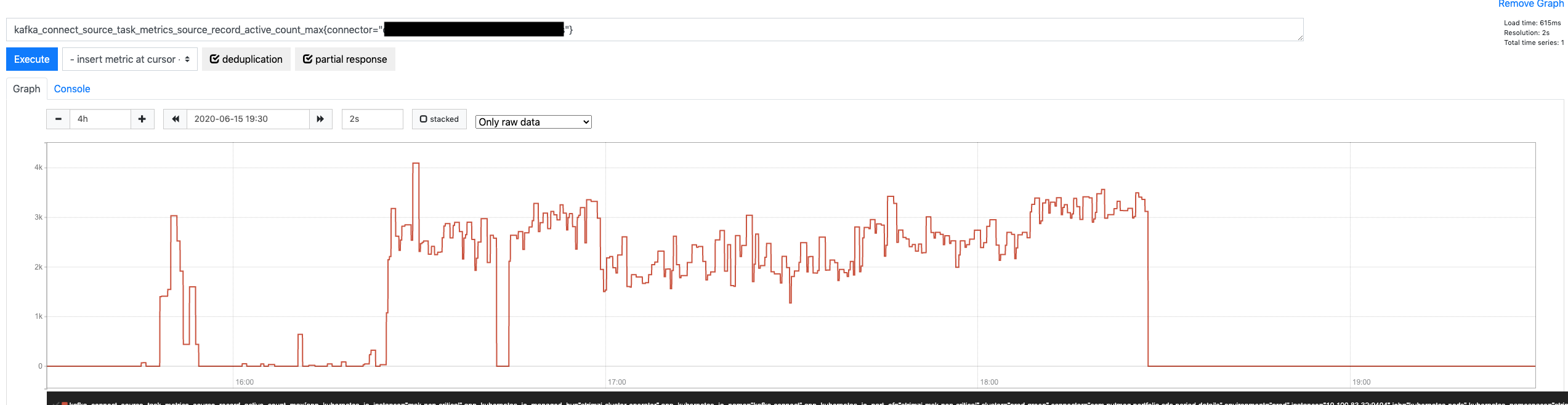
That looks all good, but how is more throughput affecting the Connector? Is it fixing anything there? Let’s look at the number of outstanding messages.

Connector Active Record Count after change

Very promising. On average, the queue is approximately 20x smaller (from peaking at around 60,000 pending messages down to 2,000 – 3,000). Admittedly, this is going to help a lot with the commit offset errors since fewer pending records mean more chances to empty the queue within the offset timeout, but is it enough? Let’s look.

Connector Offset Commit Errors after change

Perfect! Zero errors when committing offsets while the Connector is going through a maximum load period. What is even better, there is a massive margin before committing offsets would take long enough to cause an error. We just need to look at their maximum latency.

Connector Offset Commit Max Time after change

Peaking at 60 ms per request is quite good!

Conclusion

While controlling Debezium flow and restricting how large the outstanding message queue could grow (albeit indirectly) were promising strategies, going back to the basics was the best strategy.

Kafka is designed to be faster and more available than any relational database in the market (with similar hardware). That is a bold statement, but a safe one: Kafka does not do any of the great things that make relational databases so useful. It is a more straightforward system that does one thing well: ingest data at maximum speed. With that in mind, it was a matter of tweaking the right config settings to unlock its power.

That said, be aware of any modifications that you do to Kafka settings in either the client or the server-side. As it usually happens with complex, distributed systems, there might be unexpected side effects. As a general rule, as much as possible, aim to test any change in controlled environments before rolling out to production.

Kafka Connect – Offset commit errors (I)

In this post, we discuss common errors when committing offsets for connectors under load and how we can assess where the problem is, looking at Kafka Connect logs and metrics.

The Context

As part of its strategy to move into an Event-Driven Architecture, Nutmeg uses heavily Kafka Connect and Debezium to capture changes in data stored on various databases, mostly coming from legacy services. That has proven very effective to kick-start EDA systems without costly up-front investment on those legacy services.

Some of these data changes come from batch-oriented services that will kick in once a day and write heavily into the database at maximum capacity (quite frequently limited only by the EBS volume bandwidth). That, in turn, creates a considerable backlog of changes from the Debezium connector to ingest and publish to Kafka.

Intuitively, one might think that Kafka will be able to absorb those changes faster than an RDS MySQL database since only one of those two systems have been designed for big data (and it’s not MySQL). However, distributed systems are complicated beasts, and the unexpected should be, always, expected.

The Error

Every day, when one of those batch-oriented, heavy writers, was hammering the MySQL database, we would eventually get log entries coming from the connectors like this:

INFO  WorkerSourceTask{id=my-connector-0} Committing offsets (org.apache.kafka.connect.runtime.WorkerSourceTask) [pool-16-thread-1]
INFO  WorkerSourceTask{id=my-connector-0} flushing 48437 outstanding messages for offset commit (org.apache.kafka.connect.runtime.WorkerSourceTask) [pool-16-thread-1]
ERROR WorkerSourceTask{id=my-connector-0} Failed to flush, timed out while waiting for producer to flush outstanding 31120 messages (org.apache.kafka.connect.runtime.WorkerSourceTask) [pool-16-thread-1]
ERROR WorkerSourceTask{id=my-connector-0} Failed to commit offsets (org.apache.kafka.connect.runtime.SourceTaskOffsetCommitter) [pool-16-thread-1]

Without failure, a significant increase in the number of capture data changes going through the connectors would result in this type of errors. It seemed counterintuitive, though. Kafka is the fastest system here, and the MySQL database server should be the bottleneck; surely, Kafka Connect would be able to commit its offsets under the default timeout (5 seconds by default, see offset.flush.timeout.ms documentation). What was going on?

Looking Under the Hood

Before knowing why the process was failing, we need to look under the hood to understand what is happening. What does Kafka Connect do? A picture is worth a thousand words:

Kafka Connect commit process

OK, maybe this does not entirely settle it, let’s look at it step by step:

  1. A Debezium Connector starts (with task.max=1), resulting in one WorkerTask running on a Connect Worker.
  2. This WorkerTask spins out a WorkerSourceTask (Debezium is a source connector) and calls execute on it.
  3. The execute method is, basically, a big while loop that runs indefinitely, unless the task state changes to stop or paused.
  4. In every iteration of the loop, the WorkerSourceTask polls many SourceRecord instances provided by the source connector plugin (Debezium in this case).
  5. Those SourceRecord are stored in a sort of outstanding messages queue, before being provided to a KafkaProducer instance.
  6. Every SourceRecord is then send using the KafkaProducer. If you know how KafkaProducer instances work, they don’t send the record over the network when send returns.
  7. The record is sent eventually. When it gets acknowledged by the Kafka cluster, a callback is involved, which will remove the acknowledged record from the pending queue.
  8. Finally, coming from a different thread, every offset.flush.interval.ms (by default, 60 seconds) the WorkerSourceTask gets its commitOffsets method invoked, which triggers the process that results in the errors seeing the previous section.

Simple, right? Well, maybe not, but hopefully clear enough.

One key point here is that the commit process waits until the outstanding messages queue is empty to proceed. It makes sense, it wants to know what records have been successfully produced to commit their offsets, or whatever reference it is used (e.g., GTID, binlog position).

The Hypothesis

Let’s throw a hypothesis for what might be happening here:

Since committing offsets waits until the outstanding message queue is empty, if acknowledging all of them takes anywhere close to the commit offset timeout (5 sec by default), the commit process will fail. We see these errors because the large number of outstanding messages (48437 in the example) take too long to be published successfully

That sounds reasonable, but can we validate it? And can we do something about it afterward? Let’s see

Validating The Hypothesis

Let’s start by determining if the metrics confirm the errors that we see.

Are offset commits really failing?

Kafka Connect has metrics for everything, including commit offsets failing. That metric is offset-commit-failure-percentage:

Offset Commit Failure %

Unsurprisingly, the metric raises when commit offset failures are reported in the logs.

Are outstanding messages growing?

Next, we should have metrics confirming that the outstanding message queue grows almost unbounded when the connector is under heavy traffic. That metric is source-record-active-count-max (there is also an average version):

Source Record Active Count Max

There it is, an exact correlation between the outstanding message queue getting out of hand and commit offsets failing.

Why can’t Kafka keep up?

One might think: why isn’t Kafka keeping up with delivering records fast enough, so the outstanding message queue doesn’t go so large? Well, there are multiple pieces involved in this part of the process:

  • The KafkaProducer that Connect uses to publish the records to Kafka.
  • The network between the machine running the Kafka worker (K8S node in this case) and the destination Kafka cluster.
  • The Kafka cluster itself, potentially multiple brokers, if there is any replication involved (which it almost always is).

If we start with the KafkaProducer, it is important to notice that it uses a relatively standard configuration. These settings are published when the producer is created (upon task creation). If you have given a specific name to your producer’s client.id, you would see an entry like this in your logs (with many more settings, these below are just the most relevant subset):

INFO ProducerConfig values: 
    acks = all
    batch.size = 16384
    buffer.memory = 33554432
    client.id = my-connector-producer
    linger.ms = 0
    max.block.ms = 9223372036854775807
    max.in.flight.requests.per.connection = 1
    max.request.size = 1048576

From these settings, we can confirm a few things:

  • Requests will need to wait until the record has been replicated before being acknowledged, which would increase the overall request latency.
  • Whatever the number of records awaiting is, a request will only contain up to 16,384 (16K) of records. If every record took 1KB, it would only accommodate 16 records in each network roundtrip.
  • The producer will only send one request at a time. That guarantees order but decreases throughput.
  • Every request can be up to 1MB.

What is the point of having requests up to 1MB if a batch can only be 16KB? The KafkaProducer documentation answers that question:

Requests sent to brokers will contain multiple batches, one for each partition with data available to be sent.

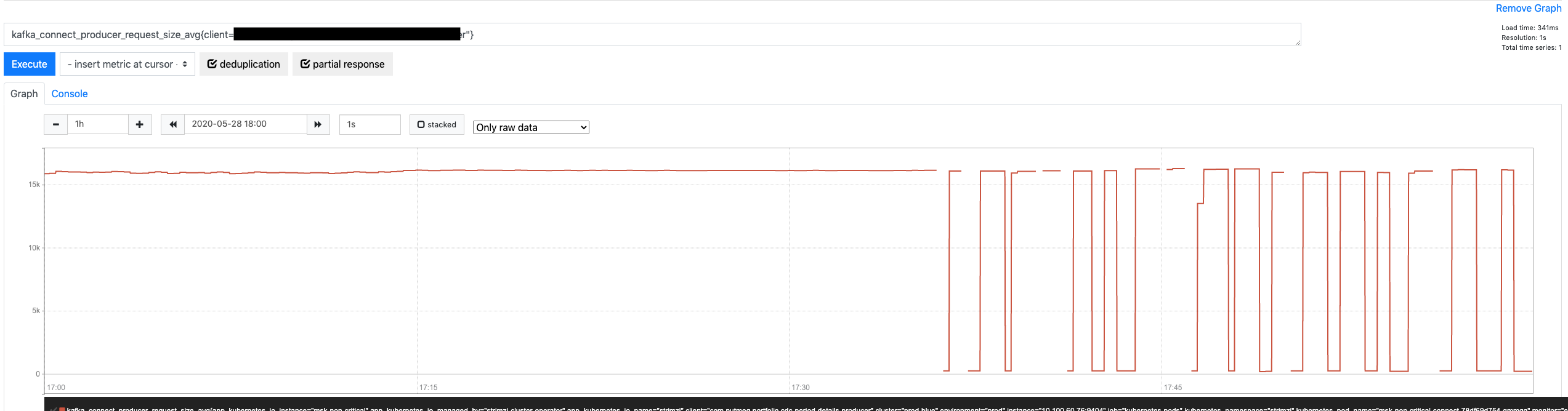
However, this connector is producing to a topic with 1 partition only, meaning the KafkaProducer will not take advantage of the ability to place multiple batches in one single request. Another metric can confirm if this is true: request-size-avg.

Producer Request Size Avg

We have this large request size, but we are only using a fraction of it.

Let’s look at this from a different angle. Based on the size of every record, how many records are we packaging in every request to the broker)? Yep, there is another metric for that: records-per-request-avg

Producer Records per Request Avg

Considering that we are packaging a mere 23 records per request, we would need more than 2,000 requests to flush out that queue as it was reported before trying to commit offsets.

Can we publish data faster?

This connector runs on a Kafka Connect worker sitting on top of a K8S node provisioned as an EC2 m5a.2xlarge instance… How much bandwidth does this family have?

According to AWS documentation, up to 10 Gbps.
However, not everybody agrees with this estimation. It seems up to means mostly a burst that won’t last for more than 3 minutes.
Instead, some put the numbers down to a more realistic 2.5 Gbps for a similar family type.

However, whatever the number, where are we up to really? How much extra bandwidth can the connector use? It is a difficult question for a couple of reasons:

  • It’s not the only connector/task running in the Connect worker. Other tasks require network too.
  • The Connect worker is not the only pod in the K8S node. Other pods will use the network as well.
  • There are also availability zones for both K8S nodes and Kafka brokers, which would have to be taken into account.

However, if we ignore all of this just for one second and we look at how much bandwidth the Connect workers are using (any of them), we can see that none of them are above a quite modest 35 MB/s.

Kafka Connect Workers Bandwidth Usage

That gives us a lot of extra bandwidth until saturating those 2.5 Gbps (i.e., 320 MB/s) for the family type. Yes, the network is shared with other pods in the K8S node, but few of them will be as network-intensive as Kafka Connect.

Can we control the flow at the source?

One could argue that, if Debezium weren’t floading the connector with MySQL data changes, none of this would matter. That is partly true, but not the cause of the problem since the SourceWorkerTask polls records from DBZ whenever it wants.

Debezium has metrics that confirm whether it has records that could provide to the SourceWorkerTask but they haven’t been requested yet: QueueRemainingCapacity

Debezium Internal Queue Remaining Capacity

This metric tells us that Debezium puts SourceRecord instances to the internal queue faster than the SourceWorkerTask is polling them. Eventually, the DBZ queue gets full; when this happens, DBZ doesn’t read more binlog entries from the MySQL database until the queue has some capacity.

Also, DBZ delivers up to max.batch.size (defaults to 2,048) records in every poll request. Since the internal queue is permanently filled up during the period where offset commits fail, it is reasonable to think that every poll will return 2K records, adding a huge extra burden to the list of outstanding messages. Yet another Connect metric (batch-size-avg) confirms this:

Connector Batch Size Avg

Conclusion

After going through all of these graphs and detailed explanations, a few things seem pretty clear:

  1. MySQL/Debezium combo is providing more data change records that Connect / Kafka can ingest.
  2. The connector is building up a large, almost unbounded list of pending messages. That is the result of its greediness: polling records from the connector constantly, even if the previous requests haven’t been acknowledged yet.
  3. Eventually, an offset commit request draws a line in the sand and expects this pending list to be empty. By the time that happens, the list is just too big.
  4. The list grows unbounded because the KafkaProducer is not optimized for throughput. It is carrying just an avg of 23 records per network roundtrip.

The solution? You’ll have to wait for the next post to find out!

References

Apache Kafka monitoring

Error tolerance in Kafka Connect (I)

Explosion
Source: https://www.freeiconspng.com/img/9157

If you have done your homework and read the Confluent blog, you probably have seen this great deep-dive into Connect error handling and Dead Letter Queues post.

Robin Moffatt does a great job explaining how Kafka Connect manages error based on connectors configuration, including sending failed records to DLQs for Sink connectors. The blog post also introduces the concept of “Error tolerance” as something that can be configured per connector and Connect will honor:

We’ve seen how setting errors.tolerance = all will enable Kafka Connect to just ignore bad messages. When it does, by default it won’t log the fact that messages are being dropped. If you do set errors.tolerance = all, make sure you’ve carefully thought through if and how you want to know about message failures that do occur. In practice that means monitoring/alerting based on available metrics, and/or logging the message failures.

The Apache Kafka Documentation describes errors.tolerance in simple terms.

Behavior for tolerating errors during connector operation. ‘none’ is the default value and signals that any error will result in an immediate connector task failure; ‘all’ changes the behavior to skip over problematic records.

Despite the succinct description, there are two interesting points in it:

  • What errors will be skipped if we choose all?
  • What does it mean problematic records?

Not all errors are born equal

If we look into the Kafka codebase, we quickly find that the logic for this error control with tolerance is centralized in one class: RetryWithToleranceOperator.

There we can find this interesting fragment:

static {
    TOLERABLE_EXCEPTIONS.put(Stage.TRANSFORMATION, Exception.class);
    TOLERABLE_EXCEPTIONS.put(Stage.HEADER_CONVERTER, Exception.class);
    TOLERABLE_EXCEPTIONS.put(Stage.KEY_CONVERTER, Exception.class);
    TOLERABLE_EXCEPTIONS.put(Stage.VALUE_CONVERTER, Exception.class);
}

This static initialization controls what errors are considered tolerable, depending on when they occur. At the moment, errors are only tolerated when they happen in the key/value/header converter or during source/sink record transformation.

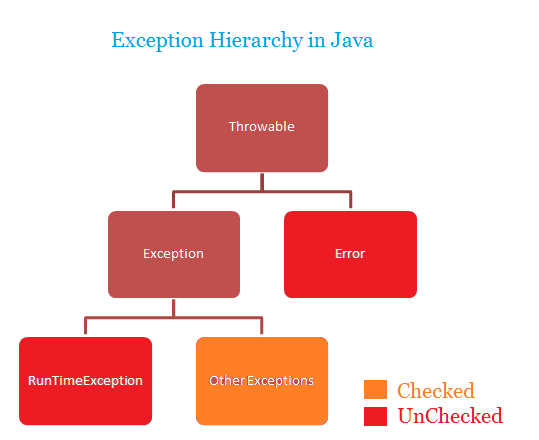
However, the Exception class does not represent all possible Java errors. Looking at the Java exception class hierarchy, we see other errors could escape this control mechanism.

Exception hierarchy in Java
Source: http://www.javawithus.com/tutorial/exception-hierarchy

That is expected, though. Reading the Javadoc for Error, this is the first paragraph:

An Error is a subclass of Throwable that indicates serious problems that a reasonable application should not try to catch. Most such errors are abnormal conditions.

Kudos to Kafka Connect for acting as a reasonable application and catching the right base exception 🙂

When is a record problematic?

Now that we know what errors are tolerated, when configured so, let’s dig a bit into what a “problematic record” represents.

As mentioned in the section above, the error tolerance mechanism is only applied during key/value/header converter and source/sink record transformation. However, there is much more to the lifecycle of a source/sink record than those steps. Once again, the Connect codebase reveals all the steps, codified in the Stage enum.

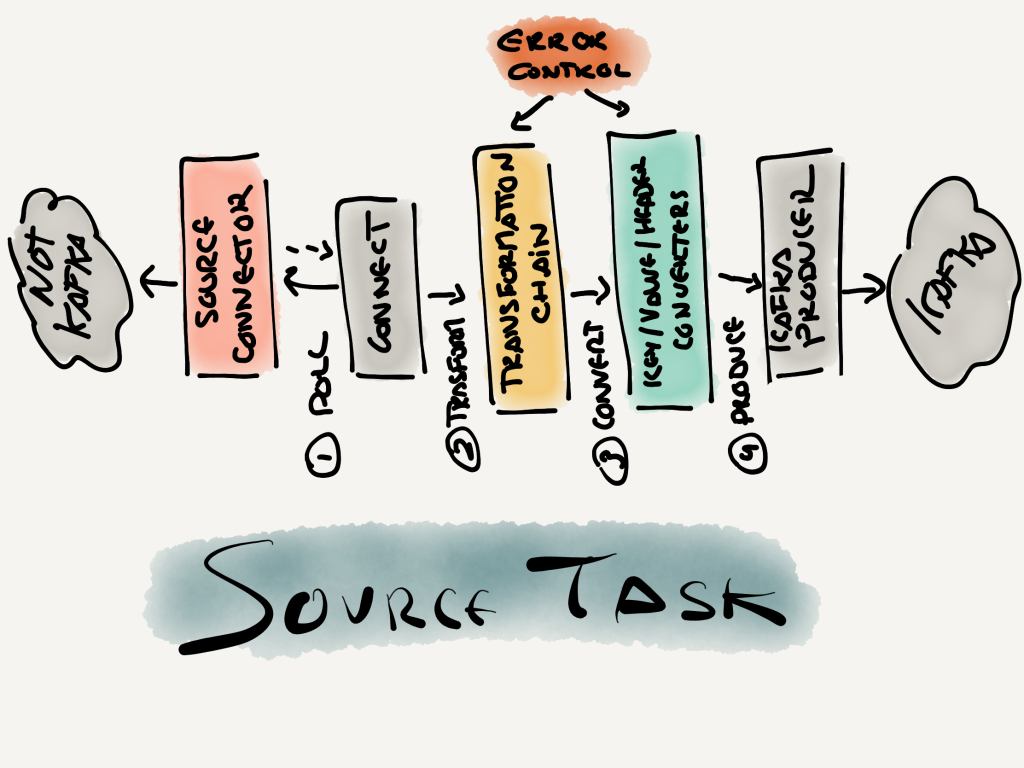
For a source task (one that takes information from a non-Kafka system and publishes it to Kafka), these are the steps:

Source task steps
Source task steps

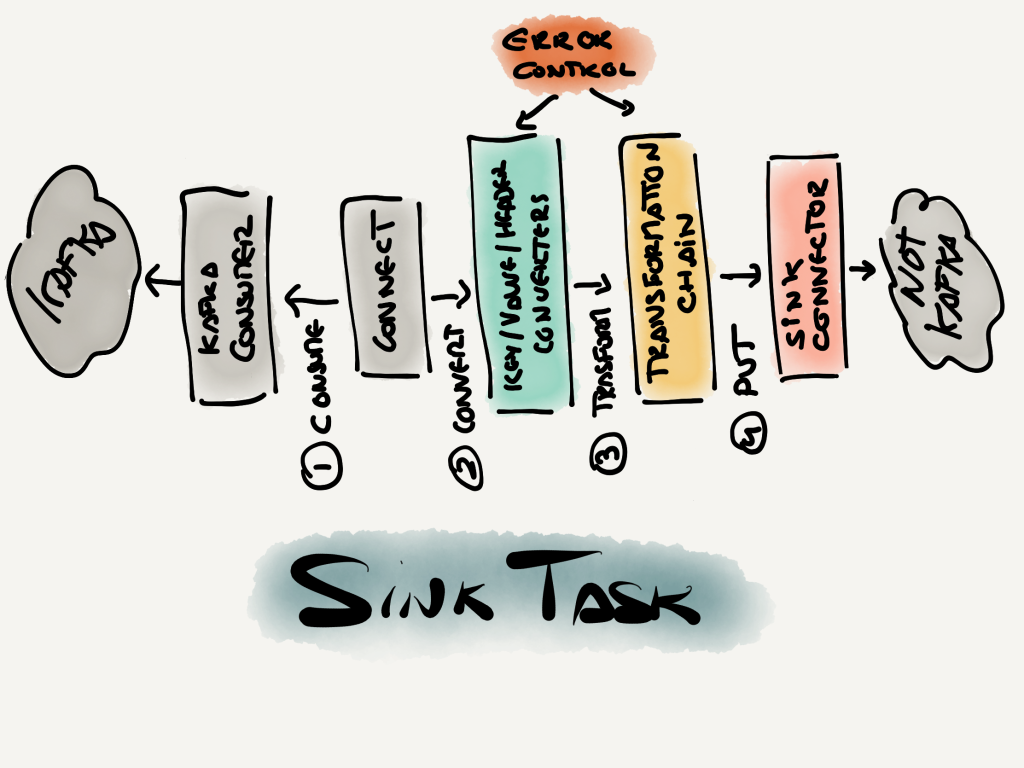
Equally, for a sink task (takes records from Kafka and send them to a non-Kafka system), the steps are:

Sink task steps
Sink task steps

If we scrutinize these two diagrams, we will notice that the error control that Connect offers us is centered around the records manipulation. In other words, the steps that are wrapped by the RetryWithToleranceOperator class should perform almost entirely deterministic operations that are exempt from the perils of distributed systems. That is not true for the AvroConverter, which registers schemas with Schema Registry. However, that is a relatively straightforward interaction compared to the complexity that Kafka Producers and Consumers deal with, not to mention the bigger unknowns happening in the many Source and Sink Connector plugins that Kafka Connect support.

In a nutshell, a problematic error is one that fails by its data. There is another name for this pattern: poison pills

Conclusion

The error mechanism in Kafka Connect is focused on managing gracefully problematic records (a.k.a., poison pills) that cause all sorts of Exception errors. Anything else outside of this scope (e.g., issues when consuming or producing Kafka records) cannot be controlled by the user through the Connector configuration, as of today.

In a subsequent post, we will zoom into those other stages in the source and sink task pipelines that aren’t controlled by configuration. That is important to understand how a Kafka Connect connector can fail, independently of what connector plugin we are using.

References

Kafka quirks: topics with names too long

http://clipart-library.com/clipart/8cznLELEi.htm

IMPORTANT: This bug is fixed in versions 2.1.2, 2.2.2, 2.3.0 and newer.

One of those bugs that you normally don’t come across… until you do. Officially, Kafka topic names can be up to 249 characters. If you try to create a topic with a name longer than that, it will reject it:

$ kafka-topics --bootstrap-server localhost:9092 --create --partitions 1 --replication-factor 1 --topic [topic name with 250 characters]
Error while executing topic command : org.apache.kafka.common.errors.InvalidTopicException: Topic name is illegal, it can't be longer than 249 characters, topic name: [topic name with 250 characters]

Pretty self-explanatory, right? Well, it’s not that simple…

249 characters? Actually… 209

While officially advertised as 249, in reality, you should not create topics with names longer than 209 characters. Why? One of the comments in the Jira ticket report explains it easily:

This limit ends up not being quite right since topic deletion ends up renaming the directory to the form topic-partition.uniqueId-delete as can be seen in LogManager.asyncDelete.

If we do the math:

  • 249 –
  • 1 character for the “.”
  • 32 characters for the uniqueId (a.k.a. UUID)
  • 7 characters for “-delete”

The result is 209. That is the longest your topic name can be if you don’t want to hit the bug.

What if I use a topic name longer than 209?

Well, terrible things… if you try to delete the topic. Otherwise nothing. But if you do try to delete the topic, the first error that you will encounter is this:

ERROR Error while renaming dir for [your long topic name here]-0 in log dir /var/lib/kafka/data (kafka.server.LogDirFailureChannel)
java.nio.file.FileSystemException: /var/lib/kafka/data/[your long topic name here]-0 -> /var/lib/kafka/data/[your long topic name here]-0.abb0d0dcdfd94e2b9222335d8bcaebcd-delete: File name too long

What is worse, your broker will keep failing upon restart, trying to remove the folder that is still pending to get deleted.

Get me out of this trap!

There is hope though if you can use a bit of SSH and connect to the broker that is failing (or maybe all of them are failing because they were all hosting partitions for the deleted topic).

Go to the directory where Kafka stores its data (log.dirs=/var/lib/kafka/data normally) and remove the folders for the partitions associated with the topic you want to get rid of.

Once that is deleted, it is time to mangle a bit with Zookeeper data. Be very careful here, if you make a mistake you will probably lose data (and maybe the whole cluster).

Log in into Zookeeper using zookeeper-shell and execute a couple of delete instructions to get rid of all traces of the faulty topic.

$ zookeeper-shell localhost:2181
rmr /admin/delete_topics/[your long topic name here]
rmr /brokers/topics/[your long topic name here]
rmr /config/topics/[your long topic name here]
quit

Now, restart your broker(s) and they should have completely forgotten that this topic ever existed…

What about AWS Kafka (MSK)?

As of this writing, MSK supports three versions:

  • 1.1.1: this version is just “too old” (published in July, 2018) and I wouldn’t recommend using it. It suffers this bug too.
  • 2.1.1: definitively suffers this bug (personally experienced it…).
  • 2.3.1: is not affected by this bug.

Therefore, my recommendation is to run Kafka 2.3.1 and take advantage of this and other bug fixes and features.

Kafka quirks: tombstones that refuse to disappear

From https://www.clipart.email/clipart/tombstone-rip-clipart-83182.html

Recently in one of the clients I consult for, I came across a strange situation: tombstone records that “refused” to disappear.

The scenario was quite simple:

  1. Kafka Streams application that materializes some state (in RocksDB).
  2. From time to time, a punctuation kicks it, pulls all the accumulated records and sends them somewhere.
  3. Upon success, it deletes all the records and calls it a day.

However, when consuming the changelog topic, I notice that there were lots of tombstone records. Having some of them made sense, that is how a “delete” should be represented in a changelog topic. However, having so many that hadn’t cleared out was unexpected.

I applied a few strategies/changes until I finally made them “gone”.

Step 1 – Roll your segments more often

Compaction only happens when the file that contains your topic/partition data is rolled. Therefore, it is important to adjust when that happens if you want to influence the compaction process:

  • segment.ms: the segment can stay open for up to this value. By default, that is 7 days.
  • segment.bytes: the segment can stay open up to this number of bytes. The default here is 1 GB, which is too big for low traffic topics.

The defaults for these two settings have “big data” stamped on them. If you don’t have a “big data” topic, chances are the process won’t be responsive enough for you.

I tried setting them up to 60,000 ms (1 min) and 1,048,576 (1 MB) respectively… with no luck. Nothing changed; tombstones were still there.

Step 2 – Tolerate less dirtiness

It is also possible that, even if your segments are rolling regularly, the log compaction thread doesn’t pick up your topic/partition file because it is not dirty enough, meaning the ratio between entries that are candidates for compaction and those that aren’t is not meeting the configured threshold.

min.cleanable.dirty.ratio controls this threshold and it is 0.5 by default, meaning you need at least 50% of your topic/partition file with “dirty” entries for compaction to run. Anything below that, the thread doesn’t find it worth doing compaction on it.

My next step was to set this value to 0.01. This quite aggressive and I wouldn’t recommend it for most topics, unless you have low volume and you really, really want to keep your topic/partition spotless.

However, this didn’t do the trick either…

Step 3 – Be less nice with your replaying consumers

When a consumer is replaying a topic from the beginning, it might encounter this problem:

  1. Offset X contains a record with Key K and Value V.
  2. A few records “later” (maybe millions…), record with Key K again, bu with a Value null, AKA tombstone.
  3. If the consumer reads the first record, but compaction runs and gets rid of the second record (the tombstone), the consumer will never know that the record with Key K has been deleted.

To compensate for this scenario, Kafka has a config setting called delete.retention.ms that controls how long tombstones should be kept around for the benefit of these consumers. Its default: 1 day.

This is very useful, but it will also keep tombstones around unnecessarily if you don’t expect any replaying consumer to read a given topic or, at least, to take as long as 1 day.

My next attempt was to configure this down to 60,000 ms (1 minute)… but still not working.

Step 4 – It’s not a feature… it’s a bug

I ran out of options here so I thought that maybe this is one of those rare and unfortunate occasions when I hit one of Kafka bugs. Fired up a quick search on Google and… voila!

Tombstones can survive forever: https://issues.apache.org/jira/browse/KAFKA-8522

Long story short, under certain circumstances, tombstones will get their “timeouts” renew regularly, meaning they will not honor delete.retention.ms and stick around.

The only walkaround that seems to work is to set delete.retention.ms to zero, forcing the tombstones to be deleted immediately, instead of sticking around for the benefit of consumers replaying the topic.

However, this solution must be used with great care. For the scenario described at the beginning, a Kafka Streams app and a changelog topic, using this option can have unexpected side effects during the Restore phase, when the app reads its changelog topics to restore its state. If, while doing so, compaction kicked in, it might miss the tombstone records for entries that it has already consumed, keeping entries in its key/value store that should have been removed.

Unfortunately, until the bug is fixed, if your app needs all these tombstones evicted from the changelog, this seems to be the only option.

Getting started with AWS MSK

Amazon Managed Streaming for Apache Kafka

Apache Kafka is one of the technologies with the fastest popularity growth in the last 10 years. AWS, always vigilant for new tech to incorporate into its offering, launched its Kafka as a managed service in February 2019: Amazon MSK.

MSK follows the RDS model: customers choose how much hardware to provision (number of nodes, CPU, memory, etc.) and AWS manages the service for you. Since Kafka is a complex software that is not easy to operate, having AWS dealing with that for you is quite appealing, especially at the beginning of your journey with it.

In this article, we are going to look at how to provision your first MSK cluster, the different options that you encounter (and what they mean) and how to do a quick-and-dirty performance testing to understand how much the most humble cluster can actually process.

Creating the smallest cluster possible

The proces starts with logging into the AWS Console, selecting/searching MSK and clicking on “Create Cluster”. That leads you to a typically dry first screen with lots of options to select. Don’t be worry, we will see what they mean one by one.

Step 1 – Sofware version

Creating MSK cluster – step 1 – software version

Firstly, we are asked for a name for the new cluster. Choose your own adventure here.

Anybody familiar with AWS will recognize the option for VPC. The easiest (and least safe) option is to choose your default VPC, which will grant access to anything to everybody. After all, we are just testing here, right?

Finally, a more important choice: the Apache Kafka version. Since AWS MSK launched, they have consistently only supported x.y.1 versions, meaning 1.1.1, 2.1.1, 2.2.1, etc. Personally, I try to stay away from x.y.0 versions, especially for least mature components like Kafka Connect or Kafka Streams. Besides that rule, choose the newest version possible to stay away from annoying bugs like this.

Step 2 – Network options

Creating MSK cluster – step 2 – availability zones

MSK offers the option to deploy your Kafka brokers to as many as 3 availability zones, being also the recommended option for high availability.

Obviously, the more availability zones, the more brokers you will get provisioned (and the more expensive your cluster will be). For simplicity, let’s go with “3” and assign the default AZ and subnet existing in your default VPC.

Step 3 – Broker configuration

Creating MSK cluster – step 3 – broker configuration

Every Kafka Broker requires configuration for a number of properties. Apache Kafka comes with defaults for pretty much all of them. However, AWS MSK overrides some of them with its own defaults. In this section, it is possible to choose your own custom configuration for Apache Kafka, assuming you have created one. In a future post, we will see how to do that. For now, let’s run with the defaults.

Step 4 – Hardware and tags

Creating MSK cluster – step 4 – hardware and tags

Things are getting interesting now. You have to choose the hardware family/size of the EC2 instances that will power your Kafka cluster, plus how many of them to run per AZ (remember, we have chosen 3 AZs). For this example, let’s go with 1 broker per AZ.

Time to look at MSK pricing. For this example, I’m going to choose the cheapest options for both instance type and storage. That would cost me, on a monthly basis (eu-west-1 region, 30-days month):

  • kafka.m5.large: 168.48$ / month
  • 1000 GB storage: 0.11$ / month
  • Total: (168.48 * 3) + (0.11 * 3) = 505.77$ / month

For reference, EC2 instance m5.large cost 77.04$/month. AWS is charging you approx. 2x for managing your Kafka cluster.

UPDATE: I got good feedback on this point. When considering all costs involved (EC2 instances for Zookeeper nodes, EC2 instances for Broker nodes, replication traffic cost, etc., the overall cost of MSK is almost the same as running the cluster yourself (assuming your DevOps team works for free… which they don’t).

AWS has published a Pricing Calculator to size your MSK cluster correctly for your expected traffic; it also compares its cost with a self-managed option. Spoiler alert, you shouldn’t do it unless you really know what you’re doing (ample experience with both AWS and Kafka), and even then it is unclear to me why you would do that to yourself 🙂

WARNING: remember to delete your cluster once you are done with the tutorial or you will regret having followed it!!

Step 5 – Security options

Creating MSK cluster – step 5 – security options

In this section you choose a bunch of security-related options:

  1. Do you want to encrypt the communication between brokers? Yeah, why not!
  2. Do you want to force your clients to use SSL/TLS? For testing, probably allowing both TLS and plaintext is the best option. For production, you might want to restrict to TLS.
  3. Should I encrypt my data at rest? Definitively yes.
  4. Should I use TLS to authenticate clients? Well, you probably want to have some form of authentication for production environments, although depends on your security requirements. For testing your first cluster, leave it unticked.

We are almost there… one more step!

Step 6 – Monitoring

Creating MSK cluster – step 6 – monitoring options

You definitively want to monitor your cluster, even if this is a “managed” service. At the end of the day, your clients might have an impact on your cluster (load, resource consumption, etc.) that AWS will definitively not monitor or alert on.

You have two choices to make here:

  • What level of monitoring do you need? There are three options: basic, cluster level or topic level. Basic level, but cluster and topic level can save your day if the cluster starts acting weird. For instance, if you find one of your topics being really hot (lots of writes and/or reads).
  • Where do you want to send your metrics? For a test cluster, CloudWatch can be good enough. For a production cluster, consider Prometheus, especially if you are already using it.

Step 7 – Have a coffee (or tea)

Creating MSK cluster – step 7- waiting for new cluster

Just fly past the “Advanced Settings” section and click “Create Cluster” and… wait, a lot. Like 15 minutes… or more.

Step 8 – Provision the client

You are going to need a client that can connect to your newly created cluster, just to play a bit with it. Let’s provision a small EC2 instance, install Kafka command-line tools and give it a spin. I won’t go into too much detail here, I assume you already know how to do this with EC2:

  1. Navigate to EC2.
  2. Click on “Launch Instance” button.
  3. Select “Amazon Linux 2 AMI (HVM), SSD Volume Type”.
  4. Select “t2.micro” from the free tier.
  5. Keep all defaults for the rest of the options.
  6. Make sure that you have the key needed to SSH into the instance. Otherwise, create a new one.

Click on View Instance to go back to the EC2 Instances section. You should see your instance here. Select it and copy/paste its public IP.

Let’s SSH into this instance (don’t bother trying to connect to the IP in this example, by the time I publish this post I will have already deleted it :)). Make sure you have the key located and do:

ssh -i [path-to-your-key] ec2-user@[ec2-public-ip]

If ssh complains about the key permissions being too open, just do a chmod 600 [key-path]to make sure they are restricted enough to make ssh happy.

Step 9 – Installing Kafka command-line tools

We are going to need the command line tools to connect to our cluster. Luckily, you can easily curl all versions of Kafka from the official download page.

curl https://downloads.apache.org/kafka/2.3.1/kafka_2.12-2.3.1.tgz -o kafka.tgz
tar -xvzf kafka.tgz

Once the file is decompressed, you have a new folder like kafka_2.12-2.3.1. Navigate to the bin subfolder to find all the command-line tools there.

However, if we try to run any of the tools here, they will all fail because we don’t have Java installed in the machine. Let’s get that too:

sudo yum install java

You will be prompted with a summary of what is going to install. Accept and wait.

Step 10 – Connecting to your cluster

Once the installation is finished, let’s try to connect to our cluster. Head back to MSK main page, choose your cluster and click on the “View client information” button on the top-right side of the screen. A pop-up window opens with the details to connect to your cluster (TLS and/or plaintext) like the one in the picture below.

Connection details pop-up window

Let’s go back to the EC2 instance and we try to list topics with the following command:

./kafka-topics.sh --bootstrap-server [first-broker plaintext url] --list   

We launch the command, we wait, we wait a little bit more, even more… and eventually we get this error:

Step 11 – Opening the Kafka port

The EC2 instance is running in its own security group, created when the instance was launched. This group allows SSH traffic to the instances that belong to it, which is why we can connect from our computers to the instance.

The MSK cluster, on the other hand, is running in the VPC default security group. This group allows incoming traffic to any port when it originates in the group itself. However, it rejects the traffic coming from the security group where the EC2 is running.

security groups setup

The good news is it has an easy solution: change the default security group to accept traffic from the EC2 instance security group. Follow these steps:

  1. Head to the “Security Groups” section under EC2.
  2. Choose the “default” security group.
  3. Click on the “Edit” button.
  4. In the pop-up window, click on the “Add Rule” button.
  5. Choose:
    1. Type: Custom TCP Rule
    2. Protocol: TCP
    3. Port: 9092 (Kafka port)
    4. Source: Custom + the name of the EC2 security group
  6. Click on the “Save” button.

That is. Go back to the EC2 instance console and try the kafka-topics command again. This time it should return quickly, but without yielding a result (there isn’t any topic in the cluster yet).

Step 12 – Launching the performance producer tool

Let’s put some load through the system, just for fun. Firstly, we need to create a topic that we will use for performance testing.

./kafka-topics.sh --bootstrap-server [first-broker plaintext url] --create --topic performance-topic --partitions 4 --replication-factor 2

With this command, we are saying we want a topic with four partitions and that should be replicated twice.

description of the performance-topic topic

Once it is created, we can launch the performance producer.

./kafka-producer-perf-test.sh --topic performance-topic --num-records 1000000 --throughput 100 --producer-props bootstrap.servers=b-1.testing-cluster.34vag9.c4.kafka.eu-west-1.amazonaws.com:9092 acks=all --record-size 10240

What this command does is:

  1. Sends 1 million records of 10KB size.
  2. Awaits replication to complete (acks=all) up to the min.in.sync.replicas number (2 in this case).
sending load to the cluster

Step 13 – Launching the performance consumer tool

How can we know that these records are going somewhere? Well, we can obviously consume them back.

Run the following command from a separate SSH session.

./kafka-consumer-perf-test.sh --broker-list b-1.testing-cluster.34vag9.c4.kafka.eu-west-1.amazonaws.com:9092 --messages 1000000 --print-metrics --show-detailed-stats --topic performance-topic

What this command does is:

  1. Consumes 1 million records.
  2. Prints detailed stats while it does so.
consuming records from the cluster

Step 14 – Watching the metrics

We can also look at CloudWatch metrics to see them live, growing with the load we are sending to the cluster. Head to Cloud Watch in your AWS Console. Once there:

  1. Click on “Metrics”.
  2. Choose “AWS/Kafka”.
  3. Choose “Broker ID, Cluster Name, Topic”.

You will see that the only topic-level metrics available are for the topic just created (the cluster does not have any other topic at the moment). Click on “Bytes In” for the 3 brokers. You will see a growing graph like this one.

Cloud Watch metrics

Make sure to configure the “Metrics Period” to 1 minute (under “Graphed Metrics”) to have a more accurate visualization.

Step 15 – Delete everything if you don’t want to pay

Once you are satisfied with all your tests, it’s time to clean everything up and avoid nasty surprises when the AWS bill arrives at the end of the month.

Head to the EC2 section first to kill your EC2 instance and follow these steps:

  1. Select “Instances” on the left menu.
  2. Select your EC2 instance to kill.
  3. Click on the “Actions” button.
  4. Choose “Instant state” -> “Terminate”.
  5. In the pop-up window, click on “Yes, terminate”.

In a few minutes, your instance will be dead. Take this opportunity to also remove its orphan security group.

  1. Select “Security Groups” on the left menu.
  2. Select the old EC2 instance security group (something like launch-wizard).
  3. Click on the “Actions” button.
  4. Choose “Delete security group”.
  5. A pop-up window informs you that you can’t delete the security group because it is being referenced from another group (the default group, remember step 11).
  6. Choose the default group, click the “Edit” button and delete the Kafka related rule (TCP port 9092).
  7. Try to delete the EC2 security group again, this time the pop-up window displays a “Yes, Delete” button. Click it to remove the security group.

Last but not least, remove the Kafka cluster. Head to MSK and choose your instance there.

deleting cluster

Type “delete” on the pop-up window. Your cluster status will change to “deleting”. A minute later, it will be gone for good.

Conclusions

15 steps aren’t the simplest process possible, but if we think about it, we have covered a lot of ground:

  1. Created the cheapest possible cluster.
  2. Provisioned an EC2 instance with the Kafka command-line tools to test the cluster.
  3. Run performance producers and consumers.
  4. Monitored the cluster load with CloudWatch.

Even more important, with a really small cluster, we were sending 100 messages/s with a total load of 1 MB/s, from one single client, and our cluster didn’t even blink.

That is the power of Kafka, one of the fastest tools available in the market when it comes to moving data. And now, with AWS MSK, it is really easy to get a cluster up and running.

Java type hinting in avro-maven-plugin

Recently, somebody shared with me the following problem: an Avro schema in Schema Registry has magically evolved into a slightly different version, albeit still backward compatible.

Schemas changing…

The first version of the schema looked like this:

{
    "type":"record",
    "name":"Key",
    "namespace":"my-namespace",
    "fields" [
        {
            "name":"UUID",
            "type":"string"
        }
    ],
    "connect.name":"my-topic.Key"
}

After it changed, the schema looked like this:

{
    "type":"record",
    "name":"Key",
    "namespace":"my-namespace",
    "fields" [
        {
            "name":"UUID",
            "type":{
                "type":"string",
                "avro.java.string":"String"
            }
        }
    ],
    "connect.name":"my-topic.Key"
}

To add up to the confusing, this is a topic published by Kafka Connect using MySQL Debezium plugin. Neither the database schema nor Connect or Debezium versions had changed anywhere close to when the schema evolved.

How could this have happened?

The mystery guest…

Although nothing had changed in the stack that was polling record changes from the MySQL database and sending them to Kafka… there was a new element to consider.

After some conversations, it was apparent that there was a new application publishing records to the same topic, for testing. This application was:

  1. Downloading the schema from Schema Registry.
  2. Doing code-generation using avro-maven-plugin against the downloaded .asvc files from Schema Registry.
  3. Producing some records using the newly created Java POJO classes.

Those seem like the right steps. However, looking into the options of avro-maven-plugin, once stood up:

  /**  The Java type to use for Avro strings.  May be one of CharSequence,
   * String or Utf8.  CharSequence by default.
   *
   * @parameter property="stringType"
   */
  protected String stringType = "CharSequence";

Could it be the culprit?

stringType does more than you expect

While the description of the property suggests something as naive as instructing the Avro code generator what class to use for Avro strings… it does more than just that.

Comparing the code for POJOs generated using maven-avro-plugin two things are different. Firstly, fields like the UUID in the schema above change their type from java.lang.CharSequence to java.lang.String; this is as expected.

However, it also changes the internal Avro schema that every Java POJO stores in:

public static final org.apache.avro.Schema SCHEMA$;

Upon changing stringType to String the resulting schema in SCHEMA$ contains the extended type definition that we saw at the beginning. The Java POJOs define this property because it is sent to Schema Registry when producing records (only once, from there one it uses the returned schema id).

Since there is no canonical representation of an Avro schema, Schema Registry chooses to take the schema as is, ignoring that both schemas are semantically identical and it should not create a new version for it.

A solution?

Can we not use stringType = String? Yes, but then all POJOs are generated using CharSequence. In my opinion, that is the best option for mixed environments. After all, this extra hint in the schema only makes sense for Java consumers.

However, if you control the topic end to end (e.g., both producers and consumers), you might as well use with stringType = String by default and guarantee that every client uses String instead of CharSequence.

In any case, both schemas are backward compatible between themselves. A correct Avro library should result in the same schema representation in whatever language you have chosen to use.