Naming Kafka objects (III) – Kafka Connectors

We discussed naming conventions for Kafka topics and Kafka Producers/Consumers in the previous two posts. This time, we are focusing on Kafka Connect and the connectors running on it.

We will not discuss naming conventions related to Kafka Connect clusters (e.g., config/storage/offset topic names, group.id, etc.) They are normally managed by SysAdmin/DevOps teams and these posts are zooming in developer-related naming conventions.

Kafka Connect in a few words

What is Kafka Connect?

Kafka Connect is a tool for streaming data between Apache Kafka and external systems, such as databases, cloud services, or file systems. It simplifies data integration by providing a scalable and fault-tolerant framework for connecting Kafka with other data sources and sinks, without the need to write custom code.

In other words, Kafka doesn’t exist in a vacuum; there are different “non-Kafka” systems that it needs to interact with, i.e., consume from and produce to. Kafka Connect simplifies this task massively by offering “connector plugins” that will translate between:

  • Protocols: SFTP->Kafka, Kafka->SFTP, Kafka->HTTP, Salesforce API->Kafka, etc.
  • Formats: CSV->Avro, Avro->JSON, Avro->Parquet, etc.

Theoretically, Kafka Connect can also translate between schemas (i.e., data mapping) via Single Message Transformations. However, I advise against using them except for the most trivial transformations.

Kafka Connect defines two types of connectors:

  • Source connectors consume data from non-Kafka systems (e.g., databases via CDC, file systems, other message brokers) and produce it for Kafka topics. These connectors are “Kafka producers” with a client connection to the source data system.
  • Sink connectors consume data from Kafka topics and produce it to non-Kafka systems (e.g., databases, file systems, APIs). Internally, they work as “Kafka Consumers” with a client connection to the destination system.

Naming Conventions

Now that we have a basic understanding of Kafka Connect let’s examine the most relevant settings that require precise, meaningful naming conventions.

connector.name

This is obviously the “number one” setting to define. A few things to consider:

  • It has to be globally unique within the Connect cluster. In other words, no connector in the cluster can share the same name.
  • It is part of the path to access information about the connector config and/or status via the Connect REST API (unless you use the expand option and get them all at once).
  • For Sink connectors, it serves as the default underlying consumer group (plus a connect- prefix). In other words, if your connector is called my-connector, the underlying consumer group will be called connect-my-connector by default.

With that in mind, the proposed naming convention is as follows:

[environment].[domain].[subdomain(s)].[connector name]-[connector version]

ComponentDescription
environment(Logical) environment that the connector is part of.

For more details, see https://javierholguera.com/2024/08/20/naming-kafka-objects-i-topics/#environment
domain.subdomain(s)Leveraging DDD to organise your system “logically” based on business/domain components.

Break down into a domain and subdomains as explained in https://javierholguera.com/2024/08/20/naming-kafka-objects-i-topics/#domain-subdomain-s
connector-nameA descriptive name for what the connector is meant to do.
connector-versionAs the connector evolves, we might need to run side-by-side versions of it or reset the connector completely giving it a new version. Format: vXY (e.g., ‘v01’, ‘v14’).

This field is not mandatory; you can skip it if this is the first deployment.

Do we really need [environment]?

This is a legit question. We said that the connector name must be (globally) unique in a given Kafka Connect cluster where it is deployed. A Kafka Connect cluster can only be deployed against a single Kafka cluster. Therefore, it can only sit in a single (physical) environment. If that is the case, isn’t the “environment” implicit?

Not necessarily:

  1. Your Kafka cluster might be serving multiple logical environments (DEV1, DEV2, etc.). As a result, a single Kafka Connect cluster might be sitting across multiple logical environments even if it belongs to a single physical environment. In this deployment topology, you might have the same connector in multiple logical environments, which would require the [environment] component to disambiguate and guarantee uniqueness.
  2. Alternatively, you might deploy multiple Kafka Connect clusters serving single logical environments against a single (physical) Kafka cluster. You might be tempted to think in this scenario [environment] is not needed since the connector name will be unique within its cluster. However, “behind the scenes”, sink connectors create a Kafka Consumer whose name matches the connector name (plus a connect- prefix). Therefore, if multiple Connect clusters with the same connector name create the same Kafka Consumer consumer group, all sort of “issues” will arise (in practice, they end up either forming a big consumer group targeting the topics across all logical environments in that physical Kafka cluster).

In summary, if you don’t use any concept of “logical environment(s)” and can guarantee that a given connector will be globally unique in the Kafka cluster, you don’t need the [environment] component.

consumer.override.group.id

Starting with 2.3.0, client configuration overrides can be configured individually per connector by using the prefixes producer.override. and consumer.override. for Kafka sources or Kafka sinks respectively. These overrides are included with the rest of the connector’s configuration properties.

Generally, I don’t recommend playing with consumer.override.group.id. Instead, it is better to give an appropriate name to your connector (via connector.name), as per the previous section.

However, there might be scenarios where you can’t or don’t want to change your connector.name yet you still need to alter your default sink connector’s consumer group. Some examples:

  • You have already deployed your connectors without [environment] in your connector.name (or other components) and now you want to retrofit them into your consumer group.
  • You have strict consumer group or connector.name naming conventions that aren’t compatible with each other.
  • You want to “rewind” your consumer group but, for whatever reason, don’t want to change the connector.name.

In terms of a naming convention, I would recommend the simplest option possible:

[environment or any-other-component].[connector.name]

In other words, I believe your consumer group name should track as closely as possible your connector.name to avoid misunderstandings.

consumer/producer.override.client.id

client.id was discussed in a previous post about Producer’s client.id and Consumer’s client.id.

As discussed in that post, it is responsible for a few things:

  • Shows up in logs to make it easier to correlate them with specific producer/consumer instances in an application with many of them (like a Kafka Streams app or a Kafka Connect cluster).
  • It shows up in the namespace/path for JMX metrics coming from producers and consumers.

With that in mind, knowing that we already have a pretty solid, meaningful and (globally) unique connector.name convention, this is how we can name our producer/consumer client.id values.

Connector TypeProperty OverrideValue
Source connectorproducer.override.client.id{connector.name}-producer
Sink connectorconsumer.override.client.id{connector.name}-consumer

Conclusion

We have discussed most relevant properties that require naming conventions in Kafka Connect connectors. As usual, we aim to have semantically meaningful values that we can use to “reconcile” what’s running in our systems and what every team (and developer) owns and maintains.

By now, we can see emerging a consistent naming approach rooted around environments, DDD naming conventions and some level of versioning (when required).
Kafka Connect – Offset commit errors (II)

In the last post, we examined the problem in detail, established a hypothesis about the issue, and validated it with multiple metrics that pointed in the expected direction.

However, I intentionally left out any suggestion for a solution, although the investigation would have given us some hints on what we can do. In this post, we look at possible solutions and the pros/cons of each one.

Controlling the flow at Debezium

As discussed in the previous post, Debezium has a number of configuration settings that influence how the Connector pre-fetches MySQL data changes and convert them into SourceRecord objects and how they are delivered to Kafka Connect when it calls poll on the connector:

SettingDefaultDescription
max.queue.size8192Max number of pre-fetched records, awaiting to be polled by Connect
max.batch.size2048Max number of records delivered in every call to poll

On the pro side, it is easy to imagine that if we restricted these two values, it would be possible to reduce the amount of data that flows from Debezium to Connect. However, on the cons side, it would be tough to configure them in a way that produces a deterministic reduction of the number of outstanding messages.

Bear in mind that, as we saw in the last post, Connect constantly calls poll, even before the previous batch of records has been acknowledged. Therefore, I expect that if we were to reduce max.batch.size to 1024, the only result we would obtain is more calls to poll from Connect while still filling the outstanding messages queue.

Think about the flow:

  1. poll returns 1024 records.
  2. Connect puts these records in the outstanding message queue.
  3. Connect sends these records with the KafkaProducer.
  4. KafkaProducer puts those records in its internal queue immediately.
  5. Connect finishes the loop and starts a new one, calling poll again.

Therefore, returning fewer records in each poll call would only slow down temporarily the queue getting filled up.

That said, if we were to also reduce max.queue.size to 1024, it would force Debezium to cross the network for every call to poll. Debezium would have to reach out to MySQL to read more records to satisfy every poll; that would definitively have an impact. However, with the default Kafka Producer settings, it is most likely that one fetch from MySQL would provide many more records than they fit in a single produce request, keeping the Kafka producing phase as the overall bottleneck end to end.

In any case, we do not want to solve the offset commit errors problem by reducing the overall system performance. That would just open the door for other issues.

Limiting the outstanding message queue

Since the root of the problem is how many records are accumulated in the outstanding message queue, one might think that limiting this queue should be the primary solution to the problem. Unfortunately, there is no setting to limit the size of this queue, and the implementation used (IdentityHashMap) is not bound either.

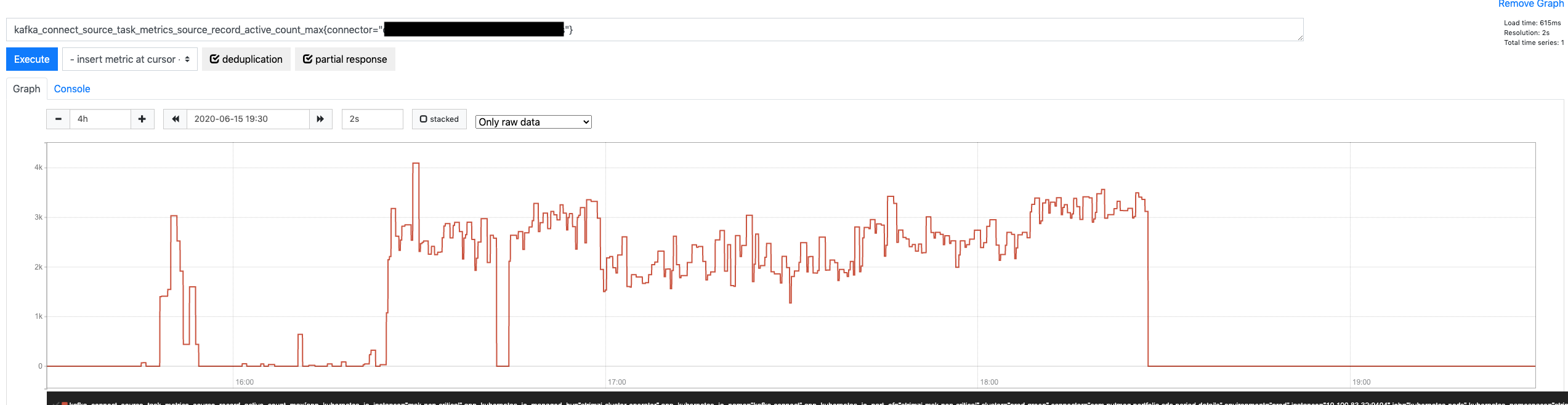
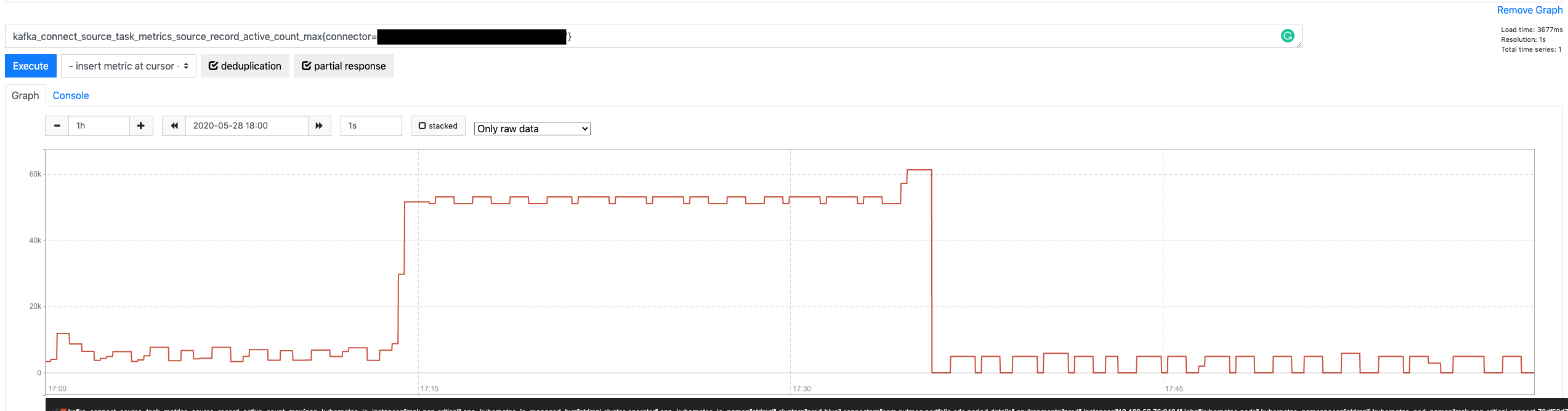
However, if we look at the graph for the source-record-active-count-max metric again, we might notice that the number of active records eventually hit the ceiling and didn’t keep growing.

Source Record Active Count Max

Doesn’t that mean that it is effectively bound? Yes, but not 🙂

It is bound in the sense that there is something that prevents it from growing ad infinitum, but that is more of a happy coincidence that a proper mechanism. What is happening is this:

  1. Records returned by poll are put on the outstanding message queue.
  2. Those same records are passed, one by one, to KafkaProducer‘s send method.
  3. The send method places them in its internal queue and returns immediately.
  4. If the KafkaProducer queue is already filled up, send doesn’t return; instead, t blocks until there is space in the queue.

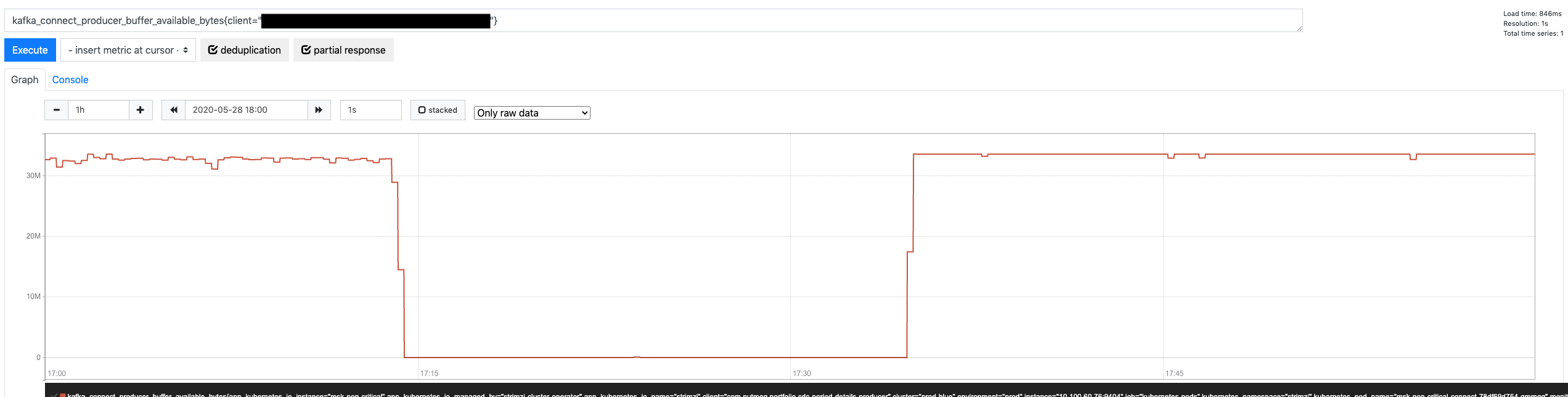
That is precisely why the outstanding queue doesn’t grow any further. It is not because it is implicitly limited; it is because the SourceWorkerTask blocks calling send once the KafkaProducer queue is filled up. When that happens, it can’t call poll anymore, and it does not add more records into the outstanding queue.

Another metric can confirm this assumption: KafkaProducer metric for available bytes in its internal queue (buffer-bytes-available)

Producer Buffer Bytes Available

Therefore, we could significantly reduce the size of the outstanding message queue if we reduce the size of the KafkaProducer internal queue, blocking earlier and stopping the SourceWorkerTask from polling more records. The KafkaProducer buffer.memory property does precisely that (defaults to 32 MB). If we reduce its size 50%, it would indirectly cause a similar reduction in the outstanding message queue.

Is this the best strategy, though? While it is the most effective to attack the heart of the problem (the outstanding message queue growing uncontrolled), it is not exempt from problems:

  • While there is a relationship between the KafkaProducer internal buffer and the outstanding message queue, they are not 100% correlated. The KafkaProducer buffer is measured in bytes, while the queue is in number of records. Therefore, their relationship is determined by the size of the consumed records. Depending on the nature of the table, those records could be either fixed in size or vary wildly (e.g., JSON columns)
  • For a more fine-grained tuning of the outstanding queue size (beyond reducing it 50%), the buffer.memory would again have to take an average of the record size into account.

All in all, it is definitively something to consider, but not the first option.

Unlocking more throughput in the Kafka Producer

I started the previous post with a bold statement:

Intuitively, one might think that Kafka will be able to absorb those changes faster than an RDS MySQL database since only one of those two systems have been designed for big data (and it’s not MySQL)

If that is the case, why is the outstanding message queue growing? Admittedly, the queue should never fill up or do it in reasonably at least. Well, the default settings for KafkaProducer optimize sending records to multiple topic/partitions across different brokers at the same time (i.e., applications writing to various topics with multiple partitions each), with multiple concurrent requests (up to 5 by default).

However, for a Debezium connector, we usually:

  • Produce to one single topic at a time (especially if the connector is ingesting a table with a lot of traffic)
  • Produce to topics with one single partition (to guarantee strict order based on the original’s table activity in the binlog)
  • By design, limit in-flight requests to 1 (again, for ordering reasons)

Therefore, we have a completely different scenario where the KafkaProducer default settings result in really poor performance. As we saw in the previous post, we are sending around 25 records per request. Compare to the 8192 records that can pile up in its internal queue and think how many network roundtrips we need to send all of those records.

The first solution to attempt here is to configure the KafkaProducer to unlock Kafka’s performance. The good news is we don’t have to do anything too complicated. Only 25 records make it to every request because every batch is, by default, limited to 16384 (see batch.size property). What happens if we were to apply an x20 factor to this property?

  1. Every network roundtrip would carry x20 more records (500)
  2. Records would be acknowledged faster and removed from the outstanding message queue
  3. By the time a commit offset kicked in, there would be fewer outstanding records, AND the KafkaProducer would be able to deliver x20 faster whatever records were pending, within the default 5-sec timeout

Since Kafka Connect 2.3 implemented the option for connector level configurations for KafkaProducer, it is possible to use them in two steps:

  1. Enable them in your Kafka Connect deployment (https://kafka.apache.org/24/documentation.html#connectconfigs): connector.client.config.override.policy = all
  2. Configure the producer settings in the connector configuration using the producer.override prefix: producer.override.batch.size = 327680

Increasing batch.size: the aftermath

What is the effect of this config change? Very significant. Let’s start with the obvious: more records per request.

Records Per Request after change

As a result of unlocking more throughput per request, the KafkaProducer in-memory buffer isn’t filling up anymore.

Producer Buffer Memory after change

That looks all good, but how is more throughput affecting the Connector? Is it fixing anything there? Let’s look at the number of outstanding messages.

Connector Active Record Count after change

Very promising. On average, the queue is approximately 20x smaller (from peaking at around 60,000 pending messages down to 2,000 – 3,000). Admittedly, this is going to help a lot with the commit offset errors since fewer pending records mean more chances to empty the queue within the offset timeout, but is it enough? Let’s look.

Connector Offset Commit Errors after change

Perfect! Zero errors when committing offsets while the Connector is going through a maximum load period. What is even better, there is a massive margin before committing offsets would take long enough to cause an error. We just need to look at their maximum latency.

Connector Offset Commit Max Time after change

Peaking at 60 ms per request is quite good!

Conclusion

While controlling Debezium flow and restricting how large the outstanding message queue could grow (albeit indirectly) were promising strategies, going back to the basics was the best strategy.

Kafka is designed to be faster and more available than any relational database in the market (with similar hardware). That is a bold statement, but a safe one: Kafka does not do any of the great things that make relational databases so useful. It is a more straightforward system that does one thing well: ingest data at maximum speed. With that in mind, it was a matter of tweaking the right config settings to unlock its power.

That said, be aware of any modifications that you do to Kafka settings in either the client or the server-side. As it usually happens with complex, distributed systems, there might be unexpected side effects. As a general rule, as much as possible, aim to test any change in controlled environments before rolling out to production.

Error tolerance in Kafka Connect (I)

Explosion
Source: https://www.freeiconspng.com/img/9157

If you have done your homework and read the Confluent blog, you probably have seen this great deep-dive into Connect error handling and Dead Letter Queues post.

Robin Moffatt does a great job explaining how Kafka Connect manages error based on connectors configuration, including sending failed records to DLQs for Sink connectors. The blog post also introduces the concept of “Error tolerance” as something that can be configured per connector and Connect will honor:

We’ve seen how setting errors.tolerance = all will enable Kafka Connect to just ignore bad messages. When it does, by default it won’t log the fact that messages are being dropped. If you do set errors.tolerance = all, make sure you’ve carefully thought through if and how you want to know about message failures that do occur. In practice that means monitoring/alerting based on available metrics, and/or logging the message failures.

The Apache Kafka Documentation describes errors.tolerance in simple terms.

Behavior for tolerating errors during connector operation. ‘none’ is the default value and signals that any error will result in an immediate connector task failure; ‘all’ changes the behavior to skip over problematic records.

Despite the succinct description, there are two interesting points in it:

  • What errors will be skipped if we choose all?
  • What does it mean problematic records?

Not all errors are born equal

If we look into the Kafka codebase, we quickly find that the logic for this error control with tolerance is centralized in one class: RetryWithToleranceOperator.

There we can find this interesting fragment:

static {
    TOLERABLE_EXCEPTIONS.put(Stage.TRANSFORMATION, Exception.class);
    TOLERABLE_EXCEPTIONS.put(Stage.HEADER_CONVERTER, Exception.class);
    TOLERABLE_EXCEPTIONS.put(Stage.KEY_CONVERTER, Exception.class);
    TOLERABLE_EXCEPTIONS.put(Stage.VALUE_CONVERTER, Exception.class);
}

This static initialization controls what errors are considered tolerable, depending on when they occur. At the moment, errors are only tolerated when they happen in the key/value/header converter or during source/sink record transformation.

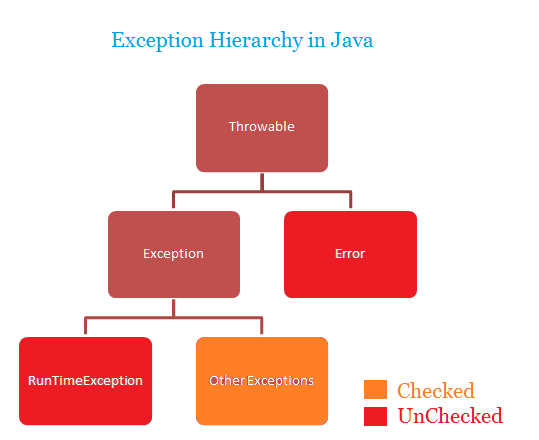
However, the Exception class does not represent all possible Java errors. Looking at the Java exception class hierarchy, we see other errors could escape this control mechanism.

Exception hierarchy in Java
Source: http://www.javawithus.com/tutorial/exception-hierarchy

That is expected, though. Reading the Javadoc for Error, this is the first paragraph:

An Error is a subclass of Throwable that indicates serious problems that a reasonable application should not try to catch. Most such errors are abnormal conditions.

Kudos to Kafka Connect for acting as a reasonable application and catching the right base exception 🙂

When is a record problematic?

Now that we know what errors are tolerated, when configured so, let’s dig a bit into what a “problematic record” represents.

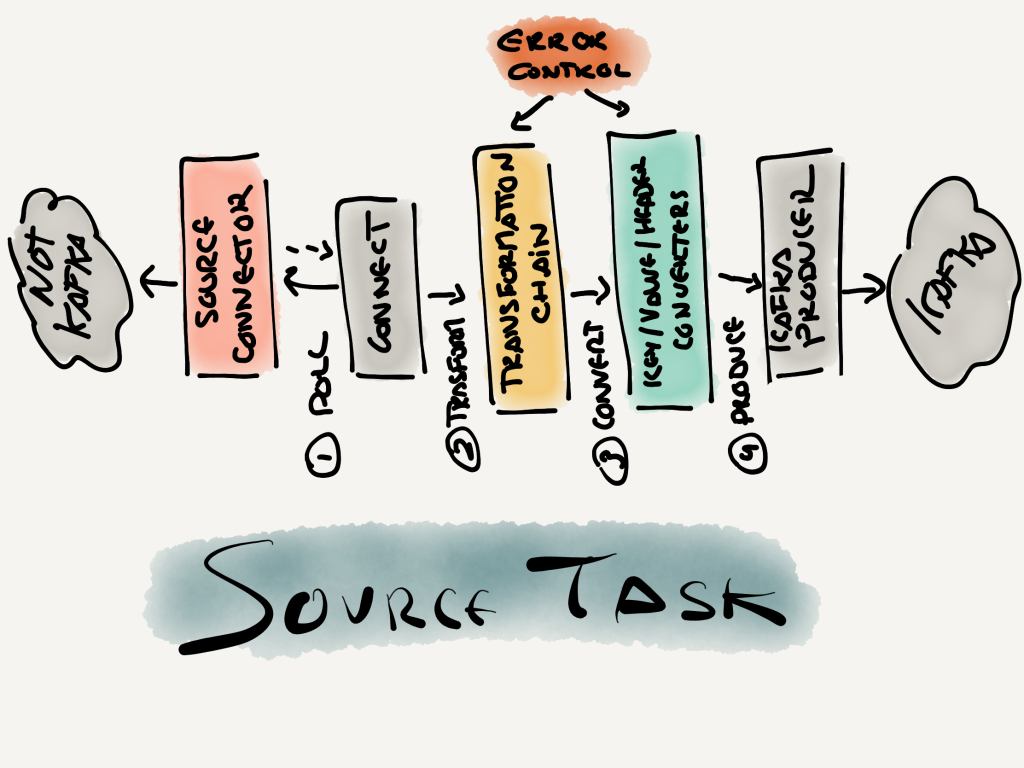
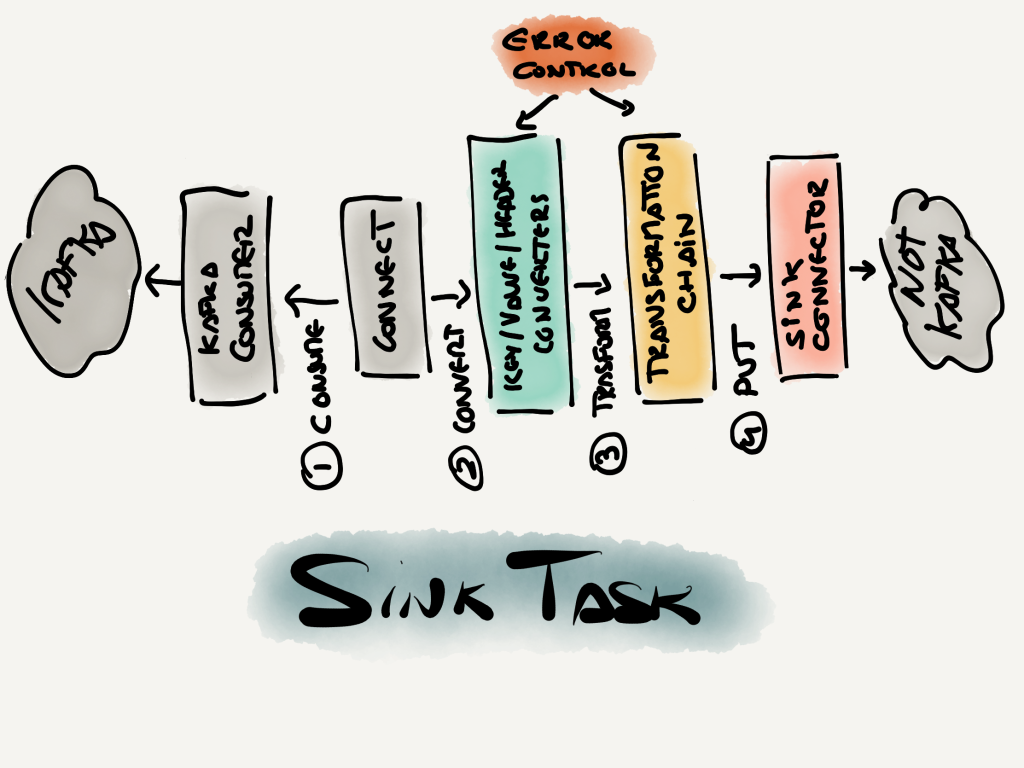
As mentioned in the section above, the error tolerance mechanism is only applied during key/value/header converter and source/sink record transformation. However, there is much more to the lifecycle of a source/sink record than those steps. Once again, the Connect codebase reveals all the steps, codified in the Stage enum.

For a source task (one that takes information from a non-Kafka system and publishes it to Kafka), these are the steps:

Source task steps
Source task steps

Equally, for a sink task (takes records from Kafka and send them to a non-Kafka system), the steps are:

Sink task steps
Sink task steps

If we scrutinize these two diagrams, we will notice that the error control that Connect offers us is centered around the records manipulation. In other words, the steps that are wrapped by the RetryWithToleranceOperator class should perform almost entirely deterministic operations that are exempt from the perils of distributed systems. That is not true for the AvroConverter, which registers schemas with Schema Registry. However, that is a relatively straightforward interaction compared to the complexity that Kafka Producers and Consumers deal with, not to mention the bigger unknowns happening in the many Source and Sink Connector plugins that Kafka Connect support.

In a nutshell, a problematic error is one that fails by its data. There is another name for this pattern: poison pills

Conclusion

The error mechanism in Kafka Connect is focused on managing gracefully problematic records (a.k.a., poison pills) that cause all sorts of Exception errors. Anything else outside of this scope (e.g., issues when consuming or producing Kafka records) cannot be controlled by the user through the Connector configuration, as of today.

In a subsequent post, we will zoom into those other stages in the source and sink task pipelines that aren’t controlled by configuration. That is important to understand how a Kafka Connect connector can fail, independently of what connector plugin we are using.

References

Java type hinting in avro-maven-plugin

Recently, somebody shared with me the following problem: an Avro schema in Schema Registry has magically evolved into a slightly different version, albeit still backward compatible.

Schemas changing…

The first version of the schema looked like this:

{
    "type":"record",
    "name":"Key",
    "namespace":"my-namespace",
    "fields" [
        {
            "name":"UUID",
            "type":"string"
        }
    ],
    "connect.name":"my-topic.Key"
}

After it changed, the schema looked like this:

{
    "type":"record",
    "name":"Key",
    "namespace":"my-namespace",
    "fields" [
        {
            "name":"UUID",
            "type":{
                "type":"string",
                "avro.java.string":"String"
            }
        }
    ],
    "connect.name":"my-topic.Key"
}

To add up to the confusing, this is a topic published by Kafka Connect using MySQL Debezium plugin. Neither the database schema nor Connect or Debezium versions had changed anywhere close to when the schema evolved.

How could this have happened?

The mystery guest…

Although nothing had changed in the stack that was polling record changes from the MySQL database and sending them to Kafka… there was a new element to consider.

After some conversations, it was apparent that there was a new application publishing records to the same topic, for testing. This application was:

  1. Downloading the schema from Schema Registry.
  2. Doing code-generation using avro-maven-plugin against the downloaded .asvc files from Schema Registry.
  3. Producing some records using the newly created Java POJO classes.

Those seem like the right steps. However, looking into the options of avro-maven-plugin, once stood up:

  /**  The Java type to use for Avro strings.  May be one of CharSequence,
   * String or Utf8.  CharSequence by default.
   *
   * @parameter property="stringType"
   */
  protected String stringType = "CharSequence";

Could it be the culprit?

stringType does more than you expect

While the description of the property suggests something as naive as instructing the Avro code generator what class to use for Avro strings… it does more than just that.

Comparing the code for POJOs generated using maven-avro-plugin two things are different. Firstly, fields like the UUID in the schema above change their type from java.lang.CharSequence to java.lang.String; this is as expected.

However, it also changes the internal Avro schema that every Java POJO stores in:

public static final org.apache.avro.Schema SCHEMA$;

Upon changing stringType to String the resulting schema in SCHEMA$ contains the extended type definition that we saw at the beginning. The Java POJOs define this property because it is sent to Schema Registry when producing records (only once, from there one it uses the returned schema id).

Since there is no canonical representation of an Avro schema, Schema Registry chooses to take the schema as is, ignoring that both schemas are semantically identical and it should not create a new version for it.

A solution?

Can we not use stringType = String? Yes, but then all POJOs are generated using CharSequence. In my opinion, that is the best option for mixed environments. After all, this extra hint in the schema only makes sense for Java consumers.

However, if you control the topic end to end (e.g., both producers and consumers), you might as well use with stringType = String by default and guarantee that every client uses String instead of CharSequence.

In any case, both schemas are backward compatible between themselves. A correct Avro library should result in the same schema representation in whatever language you have chosen to use.